
Inspiring
October 1, 2026
Question

I am a beginner, please help me

  • October 1, 2026
  • 7 replies
  • 57 views

Hello,

I am a beginner. I don't know what it's called, but I can describe it.

I have a Brother CM300 cutting machine and it needs SVG files to cut.

I created an SVG file from a photo.
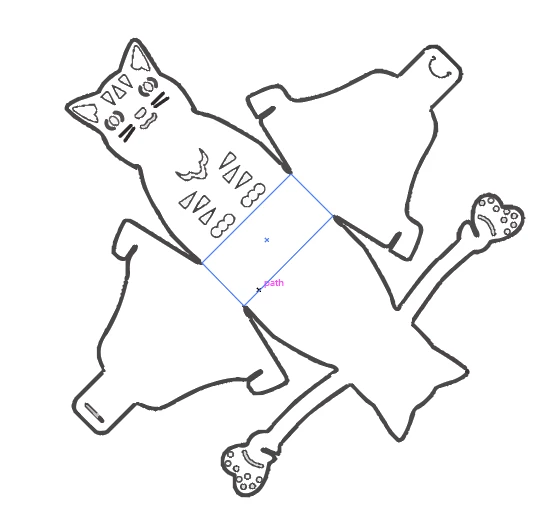
The problem is that the machine cut around the thick lines.

I can only see the blue middle box when I hover the mouse over it.

I need those blue lines because they were cut once.

How can I turn everything into a blue line and make the blue lines visible?

7 replies

Monika Gause
Community Expert
Community Expert
October 1, 2026

This is supposed to be a packaging box?

You might not want to use Image Trace on your raster image, because it could become inprecise. This is something you would need to try out.


After Image Tracing you need to expand the result before you get actual paths. But then you probably also need to delete the inside lines which should not be cut. 

Jacob Bugge
Community Expert
Community Expert
October 1, 2026

Gabor,


Based on a second reading, I believe you may have used Live Trace, and that has turned the thick outer  line into a filled Compound Path which is then cut out, and instead you wish to cut the whole cat out in one piece including the thick outer line, in other words a cut that follows the outer rim?


If that is the case, you can:

1)) Copy the Compound Outer Path, then hide all the artwork except for the copy;

2)) Select the copy Compound Outer Path and switch from Fill to Stroke so you can see what yuou are doing;

3)) Delete the inner path so you are left with only the outer path; this is your outer rim path;

4)) Give the outer rim path the Stroke Weight/Colour or whichever properties needed for your cutting machine.


I am unsure how you wish to treat the smaller thick non compound paths.


Inspiring
October 10, 2026

Thank you so much for your help.

I am a beginner, so I am just following tutorials.

I followed this tutorial: youtube tutorial link

I do not know how to do the four steps. I tried to find a tutorial, but I could not find one.

Maybe I searched for the wrong words.

Could you please help me by telling me what words I should search for on YouTube?

Monika Gause
Community Expert
Community Expert
October 10, 2026

Please show the Outline view of the file you send to the brother cutter.

The cutter will only cut lines that are visible in outline view. But also it will cut every line that can be seem in outline view.

Tina_Irvine
Community Expert
Community Expert
October 1, 2026

Hi ​@Gabor22773582n1bc,

For everything that you want as a cut path, you’ll need it to be a single path (stroke) - not a fill. Your blue lines need a stroke colour applied so you can see them.

Jacob Bugge
Community Expert
Community Expert
October 1, 2026

Gabor,


How did you (try to) create the SVG, the photo you start with being a raster image?