echoh33156725
Participating Frequently
October 6, 2026
Answered

I can't change the default "open with" back to regular Illustrator when Illustrator Beta is installed.

Why can’t I set my regular illustrator to be the default open app when I have illustrator beta installed? I don’t want to use Beta for everything, but it is nice to have here and there. It doesn't give me the option to “set as default” in the “open with” drop down. On a Macbook Pro. 

    Ton Frederiks
    Ton FrederiksCorrect answer
    Community Expert
    October 6, 2026

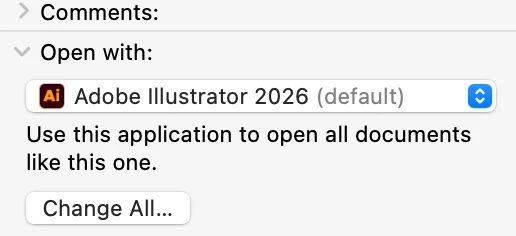
    ​@echoh33156725 You can do a get info (Cmd I) on a selected Illustrator file in the Finder, select 2026  to Open With and click the Change all to make it the default.


    2 replies

    Ton Frederiks
    Community Expert
    Ton FrederiksCommunity ExpertCorrect answer
    Community Expert
    October 6, 2026

    ​@echoh33156725 You can do a get info (Cmd I) on a selected Illustrator file in the Finder, select 2026  to Open With and click the Change all to make it the default.


    Translate
    Anubhav M
    Community Manager
    Community Manager
    October 6, 2026

    Hello ​@echoh33156725 


    Thanks for reaching out. Would you mind trying the suggestions shared in this help article (https://support.apple.com/en-hk/guide/mac-help/mh35597/mac) to change the default and let us know if that helps?


    Looking forward to hearing from you.
    Anubhav

    Translate