



1tbs
Participant
May 15, 2022
Question

I can't load a new variable library after changing anything

  • May 15, 2022
  • 3 replies
  • 409 views

I have my variables set up. I've loaded a variable library (CSV) and exported all the datasets as images.

Then I was able to load a new csv file and export it again.

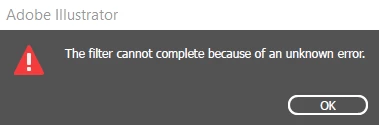
But after changing anything in the file, I now get the dreaded "The filter cannot complete because of an unknown error."

I saved a backup and deleted all the bindings and it loads. But I have too many bound objects to set up each time to do this every time I make a change and load a new csv file.


Deleting the datasets doesn't even fix it. I have to unbind and rebind the objects to get it working again.


I've had this happen before and just lived with it, but this time I have too many objects to redo it.


Is there anything I can do to get it to work?


Thanks,

Bryan
 

3 replies

Xel2289
Participant
March 3, 2026

For anyone else who has this issue in 2026: when you save, if you don’t unclick “include linked files” when it prompts you too, it will put the images in your data set into groups and it will make you unlink, delete, redo, and relink everything all over again to get back to where you were when you close.

Again, to avoid this, make sure “include linked files” is off when you go to save. It’s ridiculously unintuitive but hopefully this comment saves someone else down the line. Data sets in illustrator have some ridiculously frustrating flaws.

Participating Frequently
February 18, 2025

Chasing a fix for this, would be such a powerful tool for me but I am stuck here.


I can get it to work if I delete the dataset and relink everything. But that is time consuming, and frustrating. 


Participant
February 21, 2023

I'm getting this too.  From some fairly in depth searches it seems like this feature has been buggy for a decade or two.  Could someone from Adobe please address this PLEASE?