Participant
April 6, 2017
Answered

I can't see! Layer thumbnails are small.

  • April 6, 2017
  • 2 replies
  • 1600 views

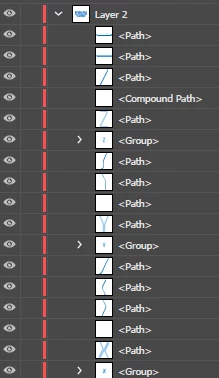
Hopefully this is a simple question and I'm just searching the forums incorrectly.  Is there any way to increase the appearance of the Layers panel so I can actually get a larger view of the thumbnails?  The below screenshot is the actual size I'm working with and it is giving me a headache and a bad attitude...

Please tell me there's a setting somewhere that I'm missing.  And in case it's not obvious, I am very new to AI and am having to 'feel my way around' with everything, just to meet a deadline.

Can someone help my eyes?!  thanks in advance.

paula
    This topic has been closed for replies.
    Correct answer Mike_Gondek10189183

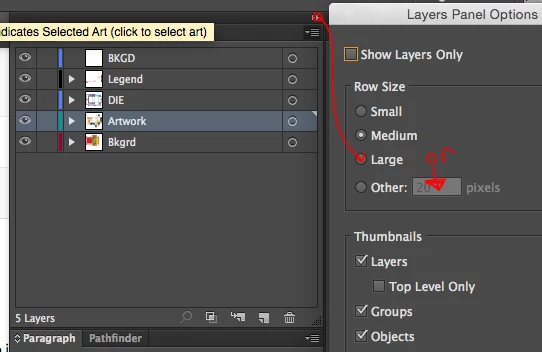
    Layers fly out menu >> panel options

    Choose large or put in  manual value to go even larger.

    2 replies

    Participant
    April 6, 2017

    Thank you, thank you, thank you!  'Panel options' was not on my flyout, but I was able to click on the drop-down menu beneath it to get to Panel options.  I am now all set.  Hopefully, today is my last day for eye-strain headaches.  Now, if I weren't so stubborn, I would have reached out weeks ago. 

    Thanks again!!

    Paula

    Mike_Gondek10189183
    Community Expert
    Community Expert
    April 7, 2017

    Sorry I circled a bit too high on the collapse panel icon, above the fly out menu, glad you figured out.

    Mike_Gondek10189183
    Community Expert
    Mike_Gondek10189183Community ExpertCorrect answer
    Community Expert
    April 6, 2017

    Layers fly out menu >> panel options

    Choose large or put in  manual value to go even larger.