

nxsx1
Participant
April 25, 2026
Question

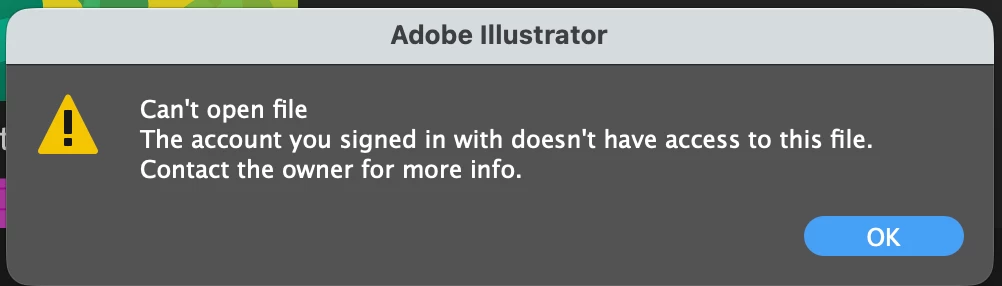
The account you signed in with does not have access to this file

  • April 25, 2026
  • 4 replies
  • 62 views

I tried open my files i saved in the Adobe Cloud but then it showed this error even though i log in with the same account i saved the file earlier. and i have never logged in another account in my laptop too.
 

    4 replies

    TailorChris
    Participant
    May 1, 2026

    I’m experiencing the same issue with a time consuming and time sensitive project i could not work on at the moment because auf of this. I’ve tried all mentioned steps for resolving the issue but unfortunately it doesn’t work. i have no local copies (shame on me) and the download of the files doesn’t work either. 

    I need to get things to production :(

    Anubhav M
    Community Manager
    Community Manager
    May 1, 2026

    Hello ​@TailorChris 


    I’m sorry to hear the suggestions did not help. I have sent you a DM. Kindly check.

    Please don’t hesitate to reach out if you have more questions or need assistance. We’d be happy to help.


    Anubhav

    analuaguilar
    Participant
    April 27, 2026

    Hi, I’m also unable to access my Adobe Cloud files inside Projects.

    I am the owner of the files, but Illustrator says I don’t have permission to open them. I also cannot download, duplicate, or save a copy.

    This started after updating Illustrator.

    It seems like a permissions or ownership issue with Adobe Projects.

    Please help me:

    • Reassign ownership of the project/files to my current profile
    • Or fix the permissions so I can access them again

    This is urgent as I cannot access my work files.

    Thank you.

    Anubhav M
    Community Manager
    Community Manager
    April 28, 2026

    Hello ​@analuaguilar 


    I'm sorry to hear about your experience. Our product team is currently investigating this issue. Would you mind trying the following steps and letting us know if they help:

    • Go to System Settings > General > Login Items > Enable CC Library.
    • Relaunch Illustrator

    If it's already enabled, remove it from the items, re-enable and then quit and relaunch the Creative Cloud Desktop app and Illustrator to see if it helps.

    If the problem persists, try enabling Full Disk Access for the Creative Cloud Desktop app from system preferences, restart your computer and relaunch to see if it helps.

    If the steps above failed, try the following steps and let us know how it goes:

    • Close all Adobe applications
    • Remove the Creative Cloud Desktop app, Core Sync, CC Library and Illustrator using the Creative Cloud Cleaner Tool (https://helpx.adobe.com/creative-cloud/kb/cc-cleaner-tool-installation-problems.html)
    • Reinstall the Creative Cloud Desktop application (https://helpx.adobe.com/download-install/kb/creative-cloud-desktop-app-download.html)
    • Reinstall and relaunch Illustrator


    Looking forward to hearing from you.
    Anubhav

    Anubhav M
    Community Manager
    Community Manager
    April 27, 2026

    Hello ​@nxsx1 


    I'm sorry to hear about your experience. Our product team is currently investigating this issue. Would you mind trying the following steps and letting us know if they help:

    • Go to System Settings > General > Login Items > Enable CC Library.
    • Relaunch Illustrator

    If it's already enabled, remove it from the items, re-enable and then quit and relaunch the Creative Cloud Desktop app and Illustrator to see if it helps.

    If the problem persists, try enabling Full Disk Access for the Creative Cloud Desktop app from system preferences, restart your computer and relaunch to see if it helps.

    If the steps above failed, try the following steps and let us know how it goes:

    • Close all Adobe applications
    • Remove the Creative Cloud Desktop app, Core Sync, CC Library and Illustrator using the Creative Cloud Cleaner Tool (https://helpx.adobe.com/creative-cloud/kb/cc-cleaner-tool-installation-problems.html)
    • Reinstall the Creative Cloud Desktop application (https://helpx.adobe.com/download-install/kb/creative-cloud-desktop-app-download.html)
    • Reinstall and relaunch Illustrator


    Looking forward to hearing from you.
    Anubhav

    Monika Gause
    Community Expert
    Community Expert
    April 25, 2026

    That one is currently going round. The engineers are on it. 

    Can you please try this here: