
christineavatar
Legend
April 2, 2019
Answered

I cannot add a layer where I need to
  • April 2, 2019
  • 3 replies
  • 544 views

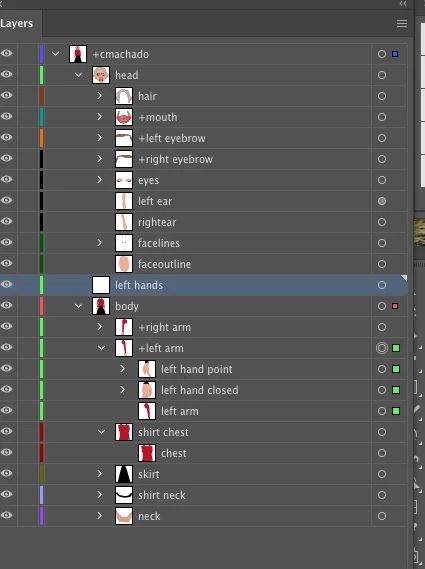
I am trying to put the 'left hands' layer into the left arm portion of my work. I need it that way to have the hands interchangeable in Character Animate. It worked fine when I did it with the right arm but the left arm shows up with a black circle with  a line through it telling me that it cannot be done. I can find no reason for this restriction. I have unlocked all layers and it is the only one with other layers within it that wont let me add to it. Help!

    This topic has been closed for replies.
    Correct answer Monika Gause

    You can either make "left arm" into a layer (but you might need to do the same for "body" - you need to check that).

    Or you make that "left hands" a group instead of a layer (shouldn't matter for Character Animator)

    3 replies

    christineavatar
    Legend
    April 3, 2019

    Thank you both. I have made the suggested corrections and it's all working fine now

    barbara_a7746676
    Community Expert
    Community Expert
    April 3, 2019

    Wonderful! Glad to be of help.

    christineavatar
    Legend
    April 3, 2019

    How do I 'un-group' it.

    Monika Gause
    Community Expert
    Monika GauseCommunity ExpertCorrect answer
    Community Expert
    April 3, 2019

    You can either make "left arm" into a layer (but you might need to do the same for "body" - you need to check that).

    Or you make that "left hands" a group instead of a layer (shouldn't matter for Character Animator)

    Monika Gause
    Community Expert
    Community Expert
    April 3, 2019

    Most probably "left arm" is a group, while "left hands" is a layer. Layers cannot be put inside groups.