Participant
March 10, 2020
質問

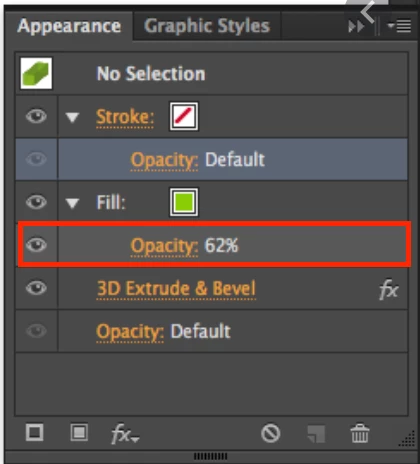
I cannot change fill opacity in javascript.
  • March 10, 2020
  • 返信数 3.
  • 1040 ビュー


I want to change fill opacity to 62.


pathItem.opacity = 62;

but it changed entire opacity not fill opacity.


Any Ideas?? Please help.

このトピックへの返信は締め切られました。

返信数 3

CarlosCanto
Community Expert
Community Expert
March 11, 2020

as mentioned, opacity is applied to objects, not to fill or stroke.


to work around that, you could record an Action that assigns the opacity of your choice, then have your script play such action. It works beautifully.

Larry G. Schneider
Community Expert
Community Expert
March 10, 2020

What happens if you use pathItem.fillColor.opacity = 62?

CarlosCanto
Community Expert
Community Expert
March 11, 2020

nothing will happen Larry, color object does not have opacity property. You would actually assign your own opacity property that you could read later like any other variable.

Mayhem SWE
Inspiring
March 10, 2020

There are unfortunately many many limitations to scripting in Illustrator. Since ExtendScript Toolkit was retired I haven't figured out any way to browser the JavaScript API but looking at the AppleScript dictionary the opacity properties that exist only seem to apply to full objects. So my best guess would be that what you're asking to do simply isn't possible.