



compartista
Inspiring
Oct 27, 2026 8:22 PM UTC
Answered

I created a 3d box and applied color to it now there are little white specs and want to know how to remove them? What am I doing wrong. I used the 3d and Materials to create and am submitting a screenshot, any help will be grateful.
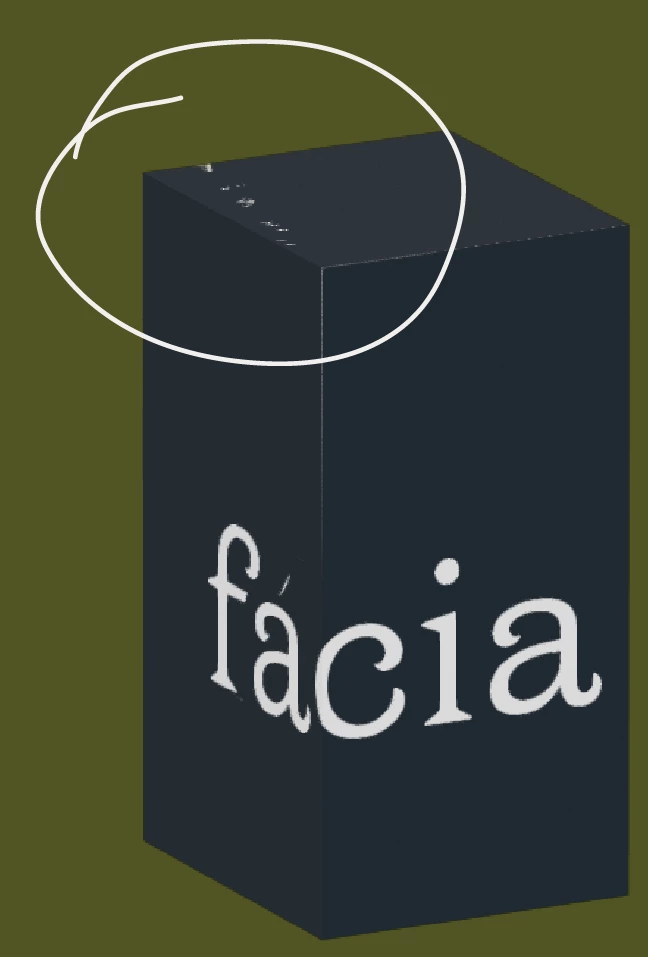
I created a 3d box and applied color to it now there are little white specs and want to know how to remove them? What am I doing wrong. 

I used the 3d and Materials to create and am submitting a screenshot, any help will be grateful. 

 

    Ton Frederiks
    Ton FrederiksCorrect answer
    Community Expert
    Oct 27, 2026 8:39 PM UTC

    ​@compartista can you try if the 3D Classic gives a better result?

    4 replies

    Ton Frederiks
    Community Expert
    Community Expert
    Nov 3, 2026 1:51 PM UTC

    ​@compartista The 2 3D options are very different. The Classic one is vector based, but has limitations for the kind of positioning you would like. In your case you need to place the symbol twice and position them manually (which is not very precise).

    Translate
    Ton Frederiks
    Community Expert
    Ton FrederiksCommunity ExpertCorrect answer
    Community Expert
    Oct 27, 2026 8:39 PM UTC

    ​@compartista can you try if the 3D Classic gives a better result?

    Translate
    compartista
    Inspiring
    Oct 27, 2026 9:27 PM UTC

    ok i’ll try that

    thank you

    Translate
    compartista
    Inspiring
    Nov 3, 2026 1:35 PM UTC

    Hello Ton,


    It worked! However now my text is on the package at 90 degrees, I noticed though that when I add the text It could not map the art. Therefore,  I made the box in classic,  then  I had to use the 3d for the text. It puts the logo in there but it won’t revolve around the box is essentially what I’m trying to do. in the properties panel when i click on the text, it stays on one part of the box. Don’t understand what I’m doing wrong. 


    T

    hanks for your input. 

    Translate