
Participant
December 29, 2019
Question

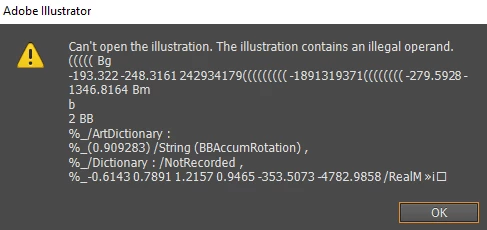
I got this error when working with Adobe Illustrator. The file is now missing several layers.
  • December 29, 2019
  • 3 replies
  • 680 views


Any help? I've tried methods such as converting it to different files through Acrobat and placing the old file into a new document. The former still resulted in a faulty image and the latter would just refuse to work.

This topic has been closed for replies.

3 replies

Jacob Bugge
Community Expert
Community Expert
December 29, 2019

zac,


Failing what Test Screen Name suggested, the following may help.


The message means that the file has been corrupted.

If someone recognizes the actual error in the code, it may be quite easy.


One thing often tried first is to create a new document and File>Place the (PDF contents, if any, of the) corrupted one to see how much may be rescued that way.


Here are some websites where you can see whether it can rescue the actual file, and if it can, you may pay for a subscription to have it done,

http://www.recoverytoolbox.com/buy_illustrator.html
http://markzware.com/adobe-software/fix-illustrator-file-unknown-error-occurred-pdf2dtp-file-recovery/
http://www.illustrator.fixtoolbox.com/
http://www.erepairillustrator.com/

As far as I remember, the first one is for Win and the second one is for Mac, while the third and fourth one should be for both.


Here are a few pages about struggling with it yourself, or maybe share crucial parts of the code and hope that someone recognizes the actual error in the code, in which case it may be quite easy.:

http://daxxter.wordpress.com/2009/04/16/how-to-recover-a-corrupted-illustrator-ai-file/
http://helpx.adobe.com/illustrator/kb/troubleshoot-damaged-illustrator-files.html
http://kb2.adobe.com/cps/500/cpsid_50032.html
http://kb2.adobe.com/cps/500/cpsid_50031.html
http://helpx.adobe.com/illustrator/kb/enable-content-recovery-mode-illustrator.html


There are also more suggestions here, on this partially overlapping help page:

https://helpx.adobe.com/illustrator/kb/troubleshoot-damaged-illustrator-files.html

Legend
December 29, 2019

Something has damaged it, is my guess. Go back through your backups to find the last one before the damage. 

Inspiring
December 29, 2019

does the file maybe contain an object created by a plugin? can you share the file?

Participant
December 29, 2019

I can share the files, sure.


One thing of note is that there are two versions of the file saved- one I did before shading, and one after. Despite saving two different files, both ended up corrupted in the same way.


https://drive.google.com/open?id=1qfbWXWxKF2ldKc5kj_879HFIPIA13qni