I have a problem finding direction in Arabic and English. When writing

I have a problem finding direction in Arabic and English. When writing, tags are missing. How to solve the problem?

I have a problem finding direction in Arabic and English. When writing, tags are missing. How to solve the problem?
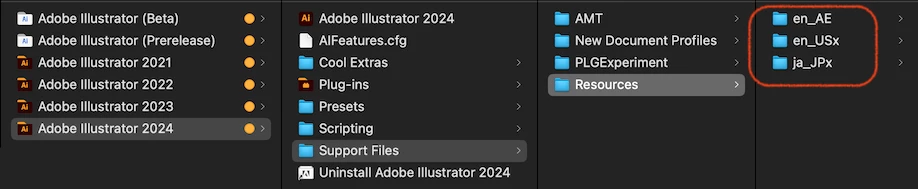
Look in the "/Applications/Adobe Illustrator 2024/Support Files/Resources" folder.
If multiple Languages are installed, disable the Languages you don't use by adding an "x" to them.
It should then start up in "en_AE". If you add an "x" to "en_AE" and remove the "x" from "en_US", it will start up in "en_US".

In the case of Illustrator, you can install multiple Languages without uninstalling the original Language, but the Language switching UI is not supported.
Already have an account? Login
No account yet? Create an account
Enter your E-mail address. We'll send you an e-mail with instructions to reset your password.