Participant
January 13, 2024
Question

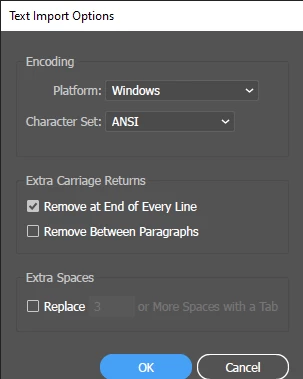
I have a problem with text import options. Please help me.
  • January 13, 2024
  • 3 replies
  • 139 views

When I opened the file, there was only text. I tried opening it on PS and PDF but it didn't work.
 
 
This topic has been closed for replies.

3 replies

Participant
April 22, 2024

Adobe helps you recover lost data from Adobe Illustrator files on your computer in case of data loss or app crash. However, the recovery feature is not enabled upon installation. You must activate the data recovery preference in the Illustrator ‘Preferences’. You can save the backup or recovery files at your specified location in a folder. If you don’t specify the location in data recovery preferences, the Illustrator files will get saved by default at the following location on your computer: 

(Don't forget to turn ON 'View>Hidden file' options)


Default Illustrator recovered file location on Windows PC:
C:\>\Users\<username>\AppData\Roaming\Adobe\Adobe Illustrator <version number> Settings\en_US*\x64\Adobe Illustrator Prefs/\DataRecovery.


Default Illustrator recovered files location on Mac:
Macintosh hard disk/Users/<username>/Library/Preferences/Adobe Illustrator <version number> Settings/en_US*/Adobe Illustrator Prefs/ DataRecovery.

Monika Gause
Community Expert
Community Expert
January 13, 2024

The file has been corrupted. You can use your backup.

If this file is on a server, try and first download it and then open.

If someone sent you the file, ask them to send it again and first ZIP it before sending.


If you do not have a backup, then you are probably lost.

The next thing you should do now is come up with a backup strategy, so that this will not happen to you again.


Maybe @Anshul_Saini  can help with the file. There is not a lot of hope, but the team can try.

Anshul_Saini
Community Manager
Community Manager
January 23, 2024

Hello @SORCERESS347718440c6s,


The fact that you are encountering issues when trying to open the file in both Photoshop (PS) and PDF indicates that there might be an issue with the file itself. Here are a few suggestions to troubleshoot and gather more information:

  • Check File Size: Confirm the file size of the problematic file. A significantly smaller size than expected might suggest corruption.

  • File Storage Location: Ensure that the file is stored in a location with stable and reliable access. Ensure it was saved properly if it's on an external drive, network drive, or server. 

  • File corruption can happen for various reasons. If the file size is unexpectedly small or there are signs of corruption, consider restoring from a backup if available.


Suppose the issue persists and you are unable to resolve it. In that case, you may want to consider using a backup or an earlier version of the file, if available, as Monika suggested already. If you have additional details, feel free to share them for more targeted assistance.


Best,

Anshul Saini

Participant
January 13, 2024