Participant
October 10, 2021
Question

I have Vers 25.4.1- just updated - First time User

  • October 10, 2021
  • 2 replies
  • 202 views

I have tried and tried to open AI on the Desk Top and all I get is the Screen Shot below 
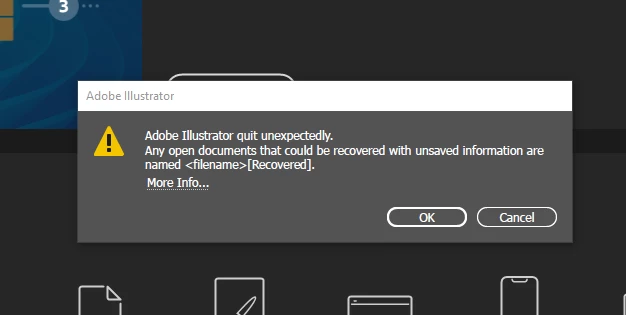
This is driving me nuts - can someone help me, on how to rectify this problem.

Thanks in Advance 

 

This topic has been closed for replies.

2 replies

Michael Bullo
Community Expert
Community Expert
October 10, 2021

You said you just updated Illustrator. Were you happily working with an earlier version? If so, the Adobe Creative Cloud allows you to have multiple versions of programs installed. You could install and use an earlier version while you sort out the problem with this version.

CFP4208Author
Participant
October 10, 2021

No I was not working happily before this.

I added AI on to my Adobe Account - and that is about as far as it got.

I updated simply because if was one of the Fix options- 

Any other offer of a fix would be greatly appreciated.


Thanks in advance 

Monika Gause
Community Expert
Community Expert
October 10, 2021

You could contact Customer Care tomorrow. They can login to your system to check this out.


https://helpx.adobe.com/contact.html

Michael Bullo
Community Expert
Community Expert
October 10, 2021

What happens if you click on the "More Info" link within the error message? Does it give you any constructive information?

CFP4208Author
Participant
October 10, 2021

Thanks for Replying 

I updated the Software as this was one of the recommendations when I selected More.

It also suggests that I update the GPU - but when going on to the site where the download is - Too Complictated.

CFO is Intel for My Laptop.


I dont understand why the instruction to fix issues are so difficult and why there are no straight answers.

This is my first time in using AI - and has not been a good start.

Can anyone advise and easy way to restore this - or who I can contact from a Phone Service assistant.

The Chat options - just brings up the same instructions and then loops back to its first suggestion.

Very very frustrating.

CFP4208Author
Participant
October 10, 2021


I have try most of these - put I am not an IT Tech- so some of this stuff is double Duch.