


Participant
June 13, 2024
Answered

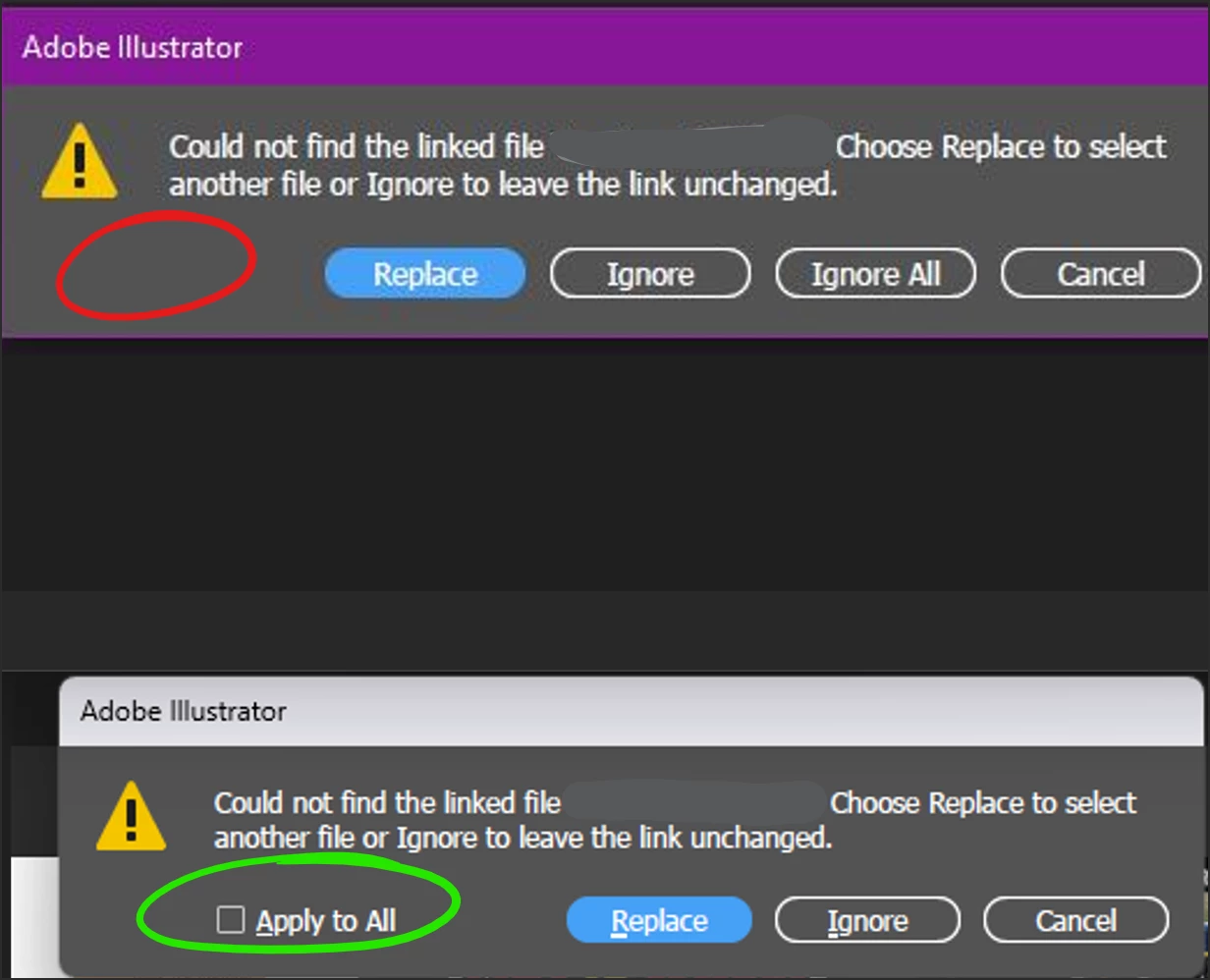
I need "Apply to All" or "Replace All" checkbox to come back!

  • June 13, 2024
  • 3 replies
  • 806 views

I manage hundreds of files that contain 20+ instances of the same linked image. Since the v28.5 update, the 'Apply to All' option is missing. It is a MASSIVE time killer to relink these images one by one.

PLEASE FIX!!!
This topic has been closed for replies.
Correct answer Anubhav M

Hello everyone,

Thanks for your patience. The Product Team has informed us that this was intentionally removed because of the relinking option. You can learn more about it here (https://adobe.ly/3Vs2LvE).

However, we will pass your feedback to the team. You can also upvote and share the feedback directly with the Product Team on this UserVoice: (https://adobe.ly/4emTpdg).
 
Feel free to reach out if you have more questions or need assistance. We'd be happy to help.
 
Thanks,
Anubhav

3 replies

Anubhav M
Community Manager
Anubhav MCommunity ManagerCorrect answer
Community Manager
June 27, 2024

Hello everyone,

Thanks for your patience. The Product Team has informed us that this was intentionally removed because of the relinking option. You can learn more about it here (https://adobe.ly/3Vs2LvE).

However, we will pass your feedback to the team. You can also upvote and share the feedback directly with the Product Team on this UserVoice: (https://adobe.ly/4emTpdg).
 
Feel free to reach out if you have more questions or need assistance. We'd be happy to help.
 
Thanks,
Anubhav
Participating Frequently
June 27, 2024

Please - please - please tell the Product Team that their relinking option DOES NOT work with the way the "Apply to All" worked.  It is different.  Without the "Apply to All" checkbox, I need to click HUNDREDS of times to link a new file (different name than placeholder graphic).  This simply is unacceptable and numerous Adobe users have stated the same.  Please have someone contact me and I will share my screen to show them that the "Apply to All" box works differently than their new method (which is not a solution but a problem).  

Participating Frequently
June 18, 2024

blaykek70520937

I too really need the "Apply to All" check box to return to Illustrator.  You mention that you are trying to relink the "same linked image" ... but I'm guessing that you are like me and trying to link a NEW file (with a different name) that is duplicated on the artboard multiple times.  In my case, I work at a commercial printer with large artboards (usually 48" x 96") and it is not unusual for me to link 200+ images per artboard.  You understand how many clicks this would be without the "Apply to All" check box.  Therefore - ADOBE - please return this "Apply to All" check box.

Anubhav M
Community Manager
Community Manager
June 13, 2024

Hello @blaykek70520937,

Thanks for reaching out. Would you mind trying the suggestions in this help article (https://adobe.ly/4bVfbDB) and letting us know if they help?

Looking forward to hearing from you.


Thanks,

Anubhav

Participant
June 13, 2024

That link is not helpful, I know how to link an image. Again, my issue is that Illustrator got rid of an essential feature. I just need the "Apply to All" checkbox to come back. 

Ton Frederiks
Community Expert
Community Expert
June 13, 2024
