
christineavatar
Legend
February 8, 2017
Answered

I need different type sizes on the same line

  • February 8, 2017
  • 13 replies
  • 2059 views

I am using the words 'never before seen on television'. The words come on sequentially
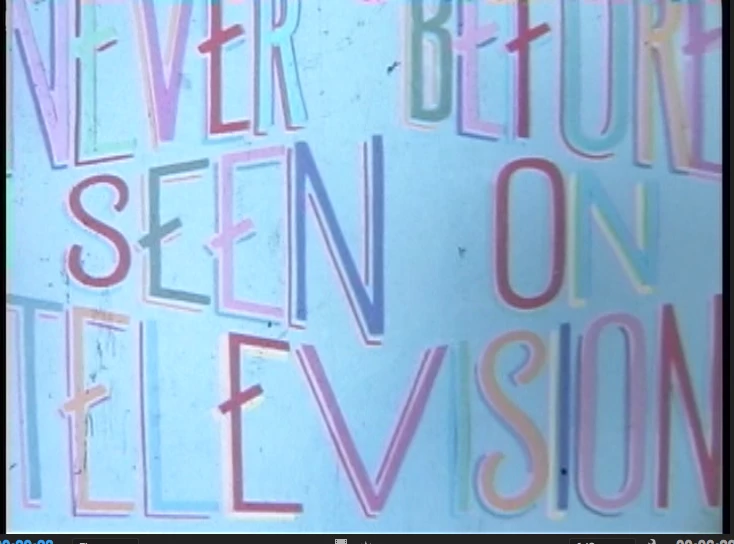
I would like to use an established typeface but I need a way to set it that accomodates the the picture above
    This topic has been closed for replies.
    Correct answer Mike_Gondek10189183

    I don't know if this is what your looking for:

    https://www.dropbox.com/s/lm6ywmn9sx7kfzq/screen%20title.ai?dl=0


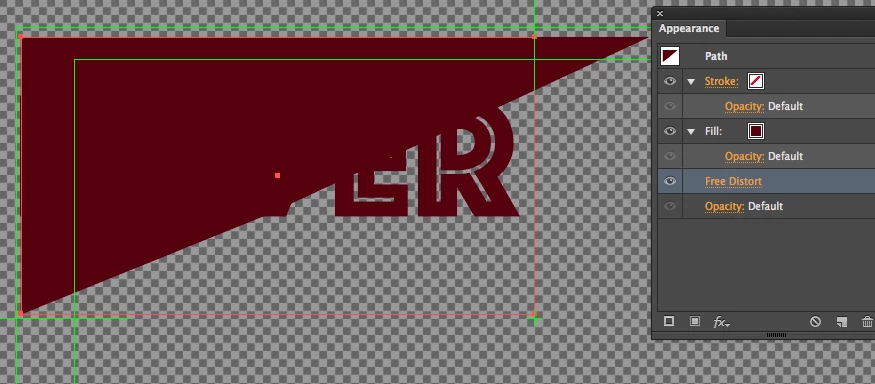
    Select the triangle shape you made, Object >> Expand Appearance. Now this will work.

    You had a free distort on there, that you did not tell us about

    Then this will work.

    13 replies

    christineavatar
    Legend
    February 14, 2017

    I just thought you'd like to see the end product:

    christineavatar
    Legend
    February 13, 2017

    Yes. Thank you very much for all your help. I mostly work in Photoshop but I figured that Illustrator would translate easily. Shows what I know.

    Thank you very much for your patience with me.

    Mike_Gondek10189183
    Community Expert
    Community Expert
    February 13, 2017

    For my part you are welcome.

    christineavatar
    Legend
    February 13, 2017

    YES!! It did work! FYI, the 'free distort' was the only way I could get the triangle to come out at all. Is there a way to do that without useing 'free distort'?

    Mike_Gondek10189183
    Community Expert
    Community Expert
    February 13, 2017

    There are many ways to draw a triangle from using the pen tool with 3 clicks to setting the polygon tool to have 3 sides using the cursor down key while drawing. You will need to explore using Illustrator more as if we hand hold you thorough all the basics you will never learn.

    christineavatar
    Legend
    February 13, 2017

    Mike have you gotten the post I  left on Saturday? Do you need something else?

    christineavatar
    Legend
    February 12, 2017

    Okay here is the link:

    https://www.dropbox.com/links

    I hope you can see it

    Mike_Gondek10189183
    Community Expert
    Community Expert
    February 12, 2017

    >.<

    Then paste the link that is in your clipboard. You link will have include a number in there showing that this is a unique item.

    christineavatar
    Legend
    February 12, 2017

    I don't know if this is what your looking for:

    https://www.dropbox.com/s/lm6ywmn9sx7kfzq/screen%20title.ai?dl=0

    christineavatar
    Legend
    February 11, 2017

    Okay, I put the AI file in Dropbox. I put the one that I have already melded into one piece. Do you need one that is 'pre-melded?

    Larry G. Schneider
    Community Expert
    Community Expert
    February 12, 2017

    Highlight the file in your Dropbox and on the right side there should be blue text that says Copy Link. Click that and then come to this thread and then in a new response, paste the link so that we may access the file. And yes include the pre-meld file.

    christineavatar
    Legend
    February 11, 2017

    I just tried again. I had the geometric form extend over the word (as always). I did the one you sent and IT WORKED!!!

    I did it again without changing a thing on my word and triangle, and I got this:

    It isn't any setting on my copy of AI or it would have effected your NEVER as well. There is something that is causing my NEVER to fall on its face - perhaps the no background on mine? It doesn't make sense.

    Mike_Gondek10189183
    Community Expert
    Community Expert
    February 11, 2017

    So that proves your install can do this,  and that you are doing the back half correctly. Suggests though that something with the construction is of, not necessarily user error. I created some inline type with with nested compound paths and worked.

    If you can somehow send me you file I could figure this out a lot easier. You are likely very close. If you elect the never and look at the appearance palette that will tel you what you have, paths, symbol, bitmapped image, compound path. A bitmapped image would be the only one i can think of this would not work with, but my suspicions are something with the never contrition is what is the problem.

    Can you also  try from the beginning with some fresh live type.

    christineavatar
    Legend
    February 10, 2017

    Hey Mike,

    Here are two photos taken, the first is me lining things up for the tada moment

    This one is taken moments afterward when I said 'dang' instead of 'tada'

    Mike_Gondek10189183
    Community Expert
    Community Expert
    February 10, 2017

    Hi Christine,

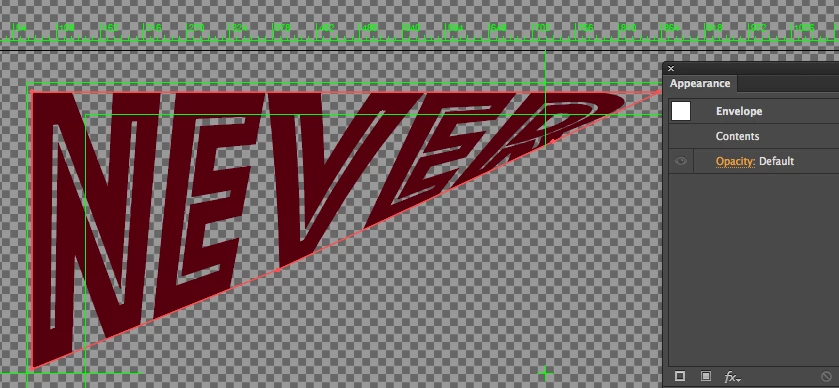
    This even works with a shape that is not closed. Try downloading my file from the link below and trying. The top one  does tho have an envelope distortion, and the below is the after, to hep you work this out.

    http://files.kaleidoscopechicago.com/_R-QJObw_2TPqpR

    never.ai

    1.2 MB

    The URL will expire on March 12.

    This should have nothing to do with your install, and resetting your prefs, but you never kn wo and if you do this test shovel provide some useful feedback.

    christineavatar
    Legend
    February 11, 2017

    I don't know how to do this but here goes - thanking you for your diligence.

          From: Mike Gondek2 <forums_noreply@adobe.com>

    To: Christine Swain Machado <(removed by moderator)>

    Sent: Friday, February 10, 2017 3:55 PM

    Subject:  I need different type sizes on the same line

    I need different type sizes on the same line

    created by Mike Gondek2 in Illustrator - View the full discussionHi Christine, This even works with a shape that is not closed. Try downloading my file from the link below and trying. The top one  does tho have an envelope distortion, and the below is the after, to hep you work this out. http://files.kaleidoscopechicago.com/_R-QJObw_2TPqpRnever.ai1.2 MBThe URL will expire on March 12.   https://forums.adobe.com/servlet/JiveServlet/downloadImage/2-9323978-1125539/ScreenShot2017-02-10at5.51.58+PM.png  This should have nothing to do with your install, and resetting your prefs, but you never kn wo and if you do this test shovel provide some useful feedback. If the reply above answers your question, please take a moment to mark this answer as correct by visiting: https://forums.adobe.com/message/9323978#9323978 and clicking ‘Correct’ below the answer Replies to this message go to everyone subscribed to this thread, not directly to the person who posted the message. To post a reply, either reply to this email or visit the message page: Please note that the Adobe Forums do not accept email attachments. If you want to embed an image in your message please visit the thread in the forum and click the camera icon: https://forums.adobe.com/message/9323978#9323978 To unsubscribe from this thread, please visit the message page at , click "Following" at the top right, & "Stop Following"  Start a new discussion in Illustrator by email or at Adobe Community For more information about maintaining your forum email notifications please go to https://forums.adobe.com/thread/1516624.  This email was sent by Adobe Community because you are a registered user.

    You may unsubscribe instantly from Adobe Community, or adjust email frequency in your email preferences

    christineavatar
    Legend
    February 9, 2017

    Okay, I did all that. I set up the type on the bottom with the triangle (which was a square) on top. Pushed all the buttons and I wound up with the lettering the same size as the original box, not the size of the triangle. What did I do wrong?

    Mike_Gondek10189183
    Community Expert
    Community Expert
    February 10, 2017

    Not sure as I do not have enough information to follow exactly what you did or did not do.

    Your lettering will be the same size if you have a square or rectangle, you need an angular line as in my example. You are basically creating a shape that your type will distort to.

    Can you please post a copy of your file with dropbox or similar? Or provide a screenshot or something to help follow what you are seeing and working with.

    christineavatar
    Legend
    February 9, 2017

    Hello Mike Gondeck2,

    I have done everything you suggested but I cannot get the two chosen at the same time. And, the option command C just copies which ever one is highlighted. Perhaps, if you could tell me what to do with instructions and idiot could follow, I would stand a better chance.

    Mike_Gondek10189183
    Community Expert
    Community Expert
    February 9, 2017
    1. With the solid arrow selection tool click to select the type block
    2. Hold down shift and click on the shape you want to distort to to add that to the selection
    3. Hold Down option & command together, keep holding them down and add the C key, release after you se the result. This is the same as Object >> Envelope Distort >> Make with top object

    If you get this error

    • make sure  the shape is on top of the type. The command is to envelope distort with the top object. You can move your shape over the type to confirm what element is on top. The color of the shape does not matter as that goes away after making an envelope, so don't be afraid to fill the shape with a color to help you confirm your layering order.