Participant
October 3, 2023
Answered

i want to draw this, please help

  • October 3, 2023
  • 2 replies
  • 317 views

Hi all 

I want to draw this in illustrator

please help me  
Thanks in advance

This topic has been closed for replies.
Correct answer Bobby Henderson

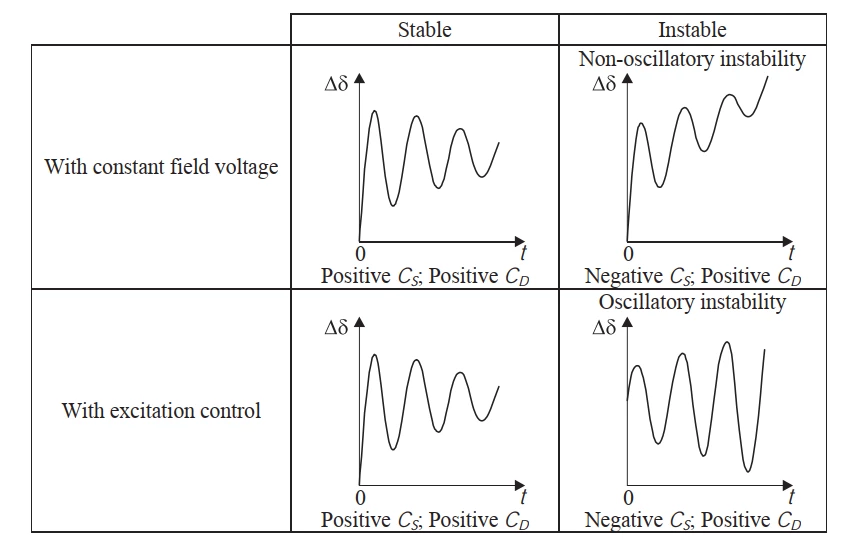
If you're needing to re-create the diagram just like it looks then import the image into Illustrator using the Place command. Lock down that layer in the Layers palette so the image can be held in place as a guide. Create a new layer and draw clean line work over the diagram using tools like the Pen Tool.


Using the Pen Tool you can adjust the wavy paths where they match the line work in the diagram even while drawing the lines. This can be done by toggling keyboard shortcuts while the Pen Tool is active. Additionally, you can adjust your view of the artwork by toggling zoom-in/out and hand-panning keyboard shortcuts while using the Pen Tool. You can zoom in tight for precise edits and back out for larger edits on the fly. It's one of the best fundamental features in Illustrator. BTW, the same keyboard shortcuts work with the Pen Tool in Photoshop. I can't tolerate hand-drawing paths using the Pen tool in rival vector drawing applications.


Use the Text tool to create duplicates of the text strings in the diagram. The type looks like it was set in Times New Roman. Current versions bundled in with Windows and Mac OSX have large character sets that include things like math symbols or the Greek alphabet.

2 replies

Bobby HendersonCommunity ExpertCorrect answer
Community Expert
October 3, 2023

If you're needing to re-create the diagram just like it looks then import the image into Illustrator using the Place command. Lock down that layer in the Layers palette so the image can be held in place as a guide. Create a new layer and draw clean line work over the diagram using tools like the Pen Tool.


Using the Pen Tool you can adjust the wavy paths where they match the line work in the diagram even while drawing the lines. This can be done by toggling keyboard shortcuts while the Pen Tool is active. Additionally, you can adjust your view of the artwork by toggling zoom-in/out and hand-panning keyboard shortcuts while using the Pen Tool. You can zoom in tight for precise edits and back out for larger edits on the fly. It's one of the best fundamental features in Illustrator. BTW, the same keyboard shortcuts work with the Pen Tool in Photoshop. I can't tolerate hand-drawing paths using the Pen tool in rival vector drawing applications.


Use the Text tool to create duplicates of the text strings in the diagram. The type looks like it was set in Times New Roman. Current versions bundled in with Windows and Mac OSX have large character sets that include things like math symbols or the Greek alphabet.

Participant
October 4, 2023

I appreciate your detailed feedback
I'm a newbie using Illustrator, I'll try to give it a try.
Thank you again 

 
Community Expert
October 4, 2023

Adobe Illustrator can be a bit intimidating at first. Just hang in there and keep experimenting with the tools. There is a lot of good how-to videos covering the basics at places like YouTube.

Kurt Gold
Community Expert
Community Expert
October 3, 2023

You may use appropriate tools to draw it (for example: Pen tool, Line tool, Rectangle tool, Type tool, Arrowheads in the Stroke palette).


Participant
October 4, 2023

Thank you friend