
nilleg57851248
Inspiring
January 16, 2017
Answered

I want to make a 3D and ad symbols, but how?

  • January 16, 2017
  • 12 replies
  • 1184 views

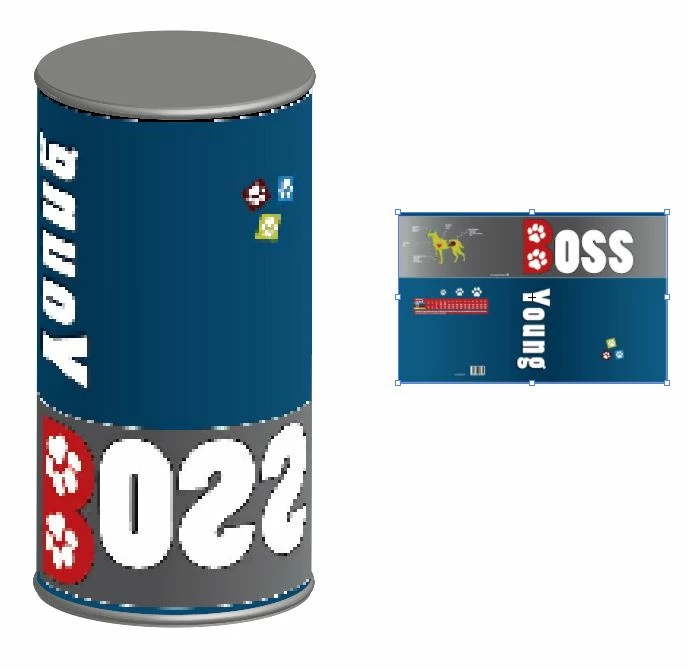
When I add my symbols it shows up wrong, - backwards, at my 3D. What do I do wrong?

I have tried to add the symbol at other surfaces, but the result is the same 😞
    This topic has been closed for replies.
    Correct answer sishamIAGD

    If Monika Gause has answered your question then please mark that as correct. Thanks you.

    12 replies

    sishamIAGD
    Community Expert
    sishamIAGDCommunity ExpertCorrect answer
    Community Expert
    January 16, 2017

    If Monika Gause has answered your question then please mark that as correct. Thanks you.

    nilleg57851248
    Inspiring
    January 16, 2017

    Yes that was what I did. But in the Building a 3D soda can  at 02.30 I learned that stroke and not fill have to be applied, so that must have changed in the software :-) ?

    Monika Gause
    Community Expert
    Community Expert
    January 16, 2017

    nilleg57851248 schrieb:

    Yes that was what I did. But in the Building a 3D soda can at 02.30 I learned that stroke and not fill have to be applied, so that must have changed in the software :-) ?

    They have not changed it.

    Strokes make your artwork far too complex and cause overlaps in sharp corners (which then causes even more issues).

    Strokes are only sometimes useful when you create 3D objects from open paths such as a bottle or a vase. So the finished objects are also open.

    nilleg57851248
    Inspiring
    January 16, 2017

    Thank You again Monika :-D

    nilleg57851248
    Inspiring
    January 16, 2017

    Wow. YES! it went well with a fill :-D

    Is that new?

    Monika Gause
    Community Expert
    Community Expert
    January 16, 2017

    Strokes have always been an issue in the 3D effects on several levels

    nilleg57851248
    Inspiring
    January 16, 2017

    I can not do it without a stroke. But without a fill is ok. I also have windowss 7.

    The result is still the same error

    Inspiring
    January 16, 2017

    Excuse me, I don't understand: why you need a stroke in your shape to revolve? Can't you use only fill color?

    nilleg57851248
    Inspiring
    January 16, 2017

    Wil do :-)

    Inspiring
    January 16, 2017

    This is the test that I described in the previous post. Just fill color. I got 7 surfaces and when I apply the symbol it works.

    Ray Yorkshire
    Participating Frequently
    January 16, 2017

    Dropbox - Symbols 3d mapping test 2017 .ai

    I had a go , with just a fill, (on windows 7)

    Guess its easy enough to use the symbol handles in map art,  to scale itself inside out ,back to front  or whatever- until it looks right

    nilleg57851248
    Inspiring
    January 16, 2017

    Now I have done it all from scratch :-) and also tried with a very simple symbol,-54. But still the same result ! ?

    Monika Gause
    Community Expert
    Community Expert
    January 16, 2017

    Your dialog box looks like you have a stroke and a fill on the base shape.

    Can you try without a stroke, just apply a fill to the base shape?

    nilleg57851248
    Inspiring
    January 16, 2017

    Monika Gause
    Community Expert
    Community Expert
    January 16, 2017

    No, you haven't applied it to the inside. Your object doesn't have an inside.

    So you must have run into a bug. So far I have only seen this on extruded shapes, not rotated ones.

    Have you by any chance applied any other effect to the shape?

    Can you create a different symbol with some simple shapes and upload the Illustrator file somewhere? I would definitely like to examine this. Thank you.

    nilleg57851248
    Inspiring
    January 16, 2017

    Yes. It look like I have applied to the inside, but how?