Known Participant
August 1, 2026
Answered

I want to make multiple shapes in to one shape. Can I do this?

  • August 1, 2026
  • 7 replies
  • 109 views

I thought this would have been a simple thing but maybe I’m being naïve.  I have three shapes that actually make up one logo.  I want to export as an SVG file for another program.  I really need it to be one shape so I want to merge them together before I export.


All I seem to be able to do is group them together.  I have tried Pathfinder Unite and Merge but I still have multiple shapes.


Is there any way to achieve this?   Should I make it a compound path?


Thanks

    Correct answer Dave Creamer of IDEAS

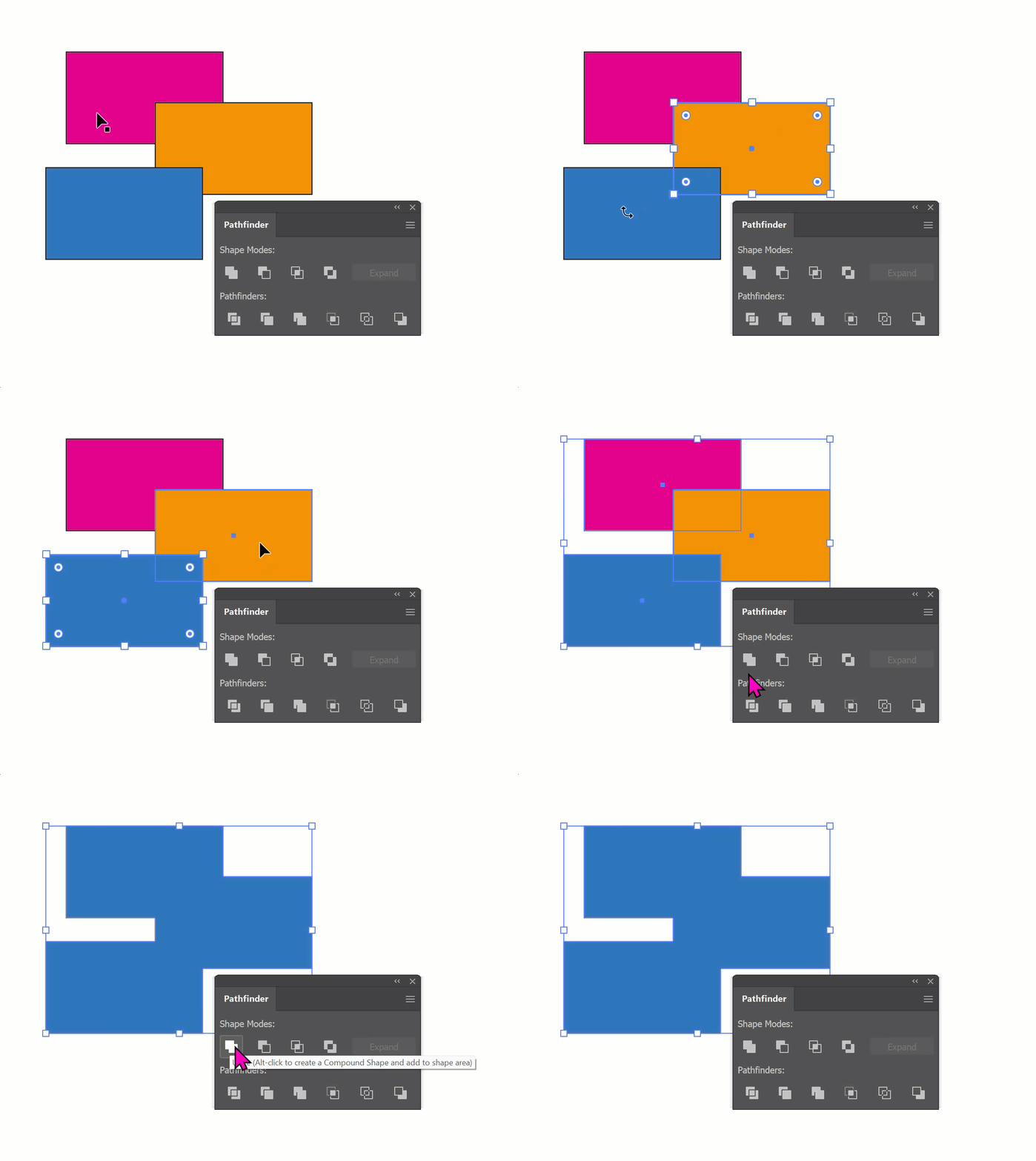
    Pathfinder panel. You probably want the Unite option. Unite will make one shape, not multiple. Are the shapes overlapping? You may need to upload a screen shot or two... 


    7 replies

    Known Participant
    August 4, 2026

    Hi,


    Apologies, I’m travelling at the moment and wanted to check my work before replying.


    I had three shapes.  Two letters of the alphabet, and a circle.  The circle is the background.

    I first positioned the two letters, overlapping, and used the Unite button.  This created a compound shape.

    I then re-size and position that over the third shape (solid circle) select both and used the Minus Front button to cut out the shape of the letters from the circle.

    This leaves me with three shapes. 


    Apologies, I now see that these are Paths.  In any case, they are three in a group.  This is where I am struggling to make it in to one single shape.  What would be the best thing to do?


    Ultimately I want to export a SVG file for Blender.

    My System: Intel i7-12700H - 64GB RAM - NVidia Geforce RTX 3070 Ti Laptop 8GB - Windows 11 Home 25H2
    Dave Creamer of IDEAS
    Community Expert
    Community Expert
    August 4, 2026

    Following your directions, this is what I got…

    Two letters, converted to outlines and ungrouped.
    Overlapped letters and United with Pathfinder panel. 
    Now single-shape letters placed over ellipse (circle or oval).
    Single shape result with Minus Front from Pathfinder panel.


    David Creamer: Community Expert (ACI and ACE 1995-2023)
    Known Participant
    August 4, 2026

    The letters I created were traced using the Pen tool.  Does this make a difference?


    Ultimately I want to export an SVG that only has one shape.  Is this even possible?


    In my example, I get the desired look at the end, but I have 3 Paths.  In this example I have traced around the H and P of the HP logo.


    My System: Intel i7-12700H - 64GB RAM - NVidia Geforce RTX 3070 Ti Laptop 8GB - Windows 11 Home 25H2
    Monika Gause
    Community Expert
    Community Expert
    August 1, 2026

    If the shapes do not overlap, you need to make a compound path.

    Dave Creamer of IDEAS
    Community Expert
    Dave Creamer of IDEASCommunity ExpertCorrect answer
    Community Expert
    August 1, 2026

    Pathfinder panel. You probably want the Unite option. Unite will make one shape, not multiple. Are the shapes overlapping? You may need to upload a screen shot or two... 


    David Creamer: Community Expert (ACI and ACE 1995-2023)