

GracyS
Participant
September 7, 2022
Answered

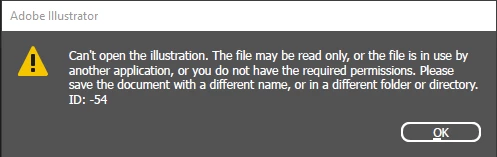
ID: -54

  • September 7, 2022
  • 2 replies
  • 430 views

After uploading a file in the adobe cloud, I needed to download it again to make a few changes. After downloading it, I can't seem to be able to open it anymore. I've tried changing the file's name and copying & pasting in different folders, but it hasn't worked. Does anyone know how to solve this? 


TIA!
This topic has been closed for replies.
Correct answer Anubhav M

Hello GracyS,


Sorry to hear about this experience. Working on files saved on an external/network drive or a cloud-synced folder is not recommended and can cause problems such as the file getting corrupted. The ideal way to access your work across multiple devices is to save it as a Cloud Document.


It might be possible that the file can no longer be repaired. Would you mind sharing a download link to the file here or via DM so we can check it on our end? Although we cannot guarantee a successful recovery, we will try our best to do so.


Looking forward to your response.


Thanks,

Anubhav

2 replies

Ton Frederiks
Community Expert
Community Expert
September 7, 2022

What do you mean by "uploading a file in the adobe cloud"?

Did you save it as an Illustrator  Cloud document (.aic)?

Or did you save it locally in the Creative Cloud Files Folder?

Or somewhere else?

Anubhav M
Community Manager
Anubhav MCommunity ManagerCorrect answer
Community Manager
September 7, 2022

Hello GracyS,


Sorry to hear about this experience. Working on files saved on an external/network drive or a cloud-synced folder is not recommended and can cause problems such as the file getting corrupted. The ideal way to access your work across multiple devices is to save it as a Cloud Document.


It might be possible that the file can no longer be repaired. Would you mind sharing a download link to the file here or via DM so we can check it on our end? Although we cannot guarantee a successful recovery, we will try our best to do so.


Looking forward to your response.


Thanks,

Anubhav