Kit Builder
Participant
March 21, 2022
Question

ID Naming Issue in SVG in Illustrator

  • March 21, 2022
  • 2 replies
  • 759 views

When you have the same ID name in an SVG, Illustrator adds a huge string on numbers ...
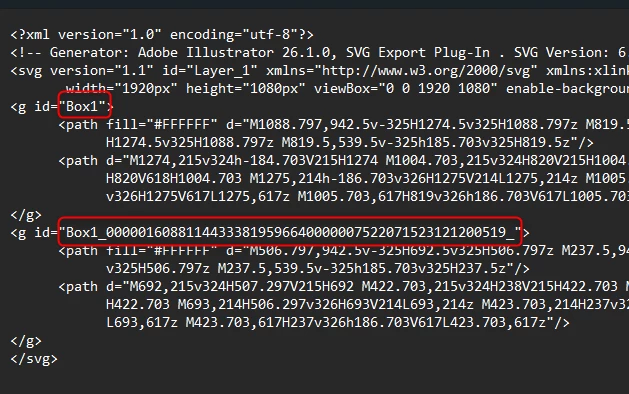
 

Is there a way to stop this?

Thanks

This topic has been closed for replies.

2 replies

Participant
August 28, 2024

I've experienced this problem randomly for quite some time now with no real explanation out there..?
I've found that this string of numbers is applied so randomly, I can't find a common element triggering it. We use this ID to label checkboxes, looks pretty silly... 


Srishti_Bali
Legend
August 28, 2024

Hi @ConorOHare


Thank you for reaching out! Could you please provide a few more details?


  • Your OS and the version of Illustrator you're using.
  • Did you notice this change after the recent update?
  • Can you share a sample file?


We’re here to help; we just need a bit more information.


Regards,

Srishti


Participant
August 29, 2024

Hi Srishti, 
I'm running Windows 10 & Illustrator 28.1
This problem of the extra numbers being added to the id has been happening for a while now, definitely before this version and I'd say that it happens from "rarely to sometimes".  I've attached a screenshot and highlighted how it renders in Chrome, the illustrator file that is the source and the exported SVG file.
In relation to the latest update, the generated SVG code changed so dramatically that we had to revert to v28.1 in order for our website to work as per normal.
Thanks Conor

Mylenium
Legend
March 21, 2022

Have you actually assigend a consistent style to the items in question?


Mylenium

Kit Builder
Participant
March 21, 2022

Consistent style?

This was just a quick example, same box named and copied, but happening on every SVG that's saved out 

If something has the same name in the layers window, then the ID is crazy long

Kit Builder
Participant
March 21, 2022


saved out as an SVG...