Optamizm
Participant
January 19, 2018
Question

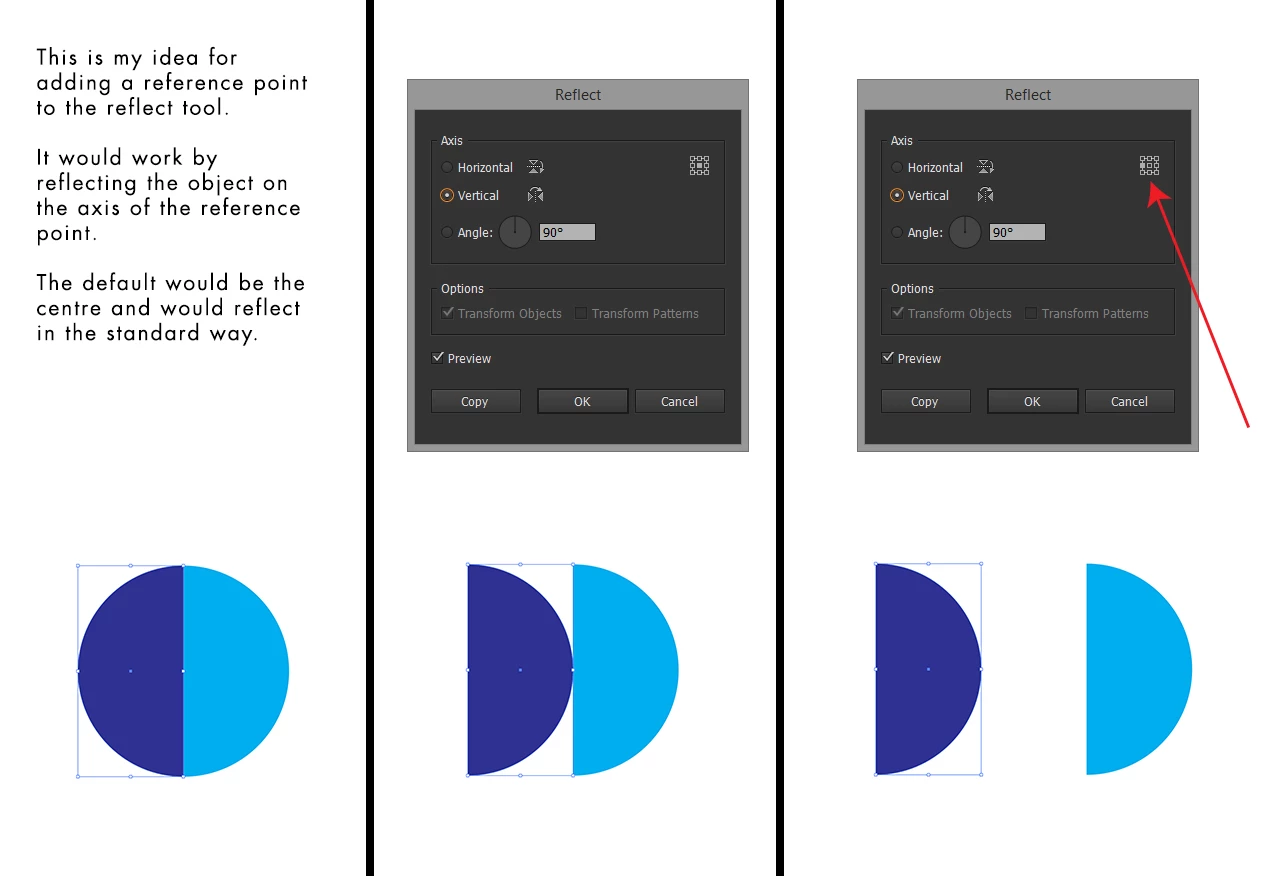
Idea for addition to the reflect tool.

  • January 19, 2018
  • 4 replies
  • 349 views

What do you think of my idea and is this the best place to submit it?
    This topic has been closed for replies.

    4 replies

    Optamizm
    OptamizmAuthor
    Participant
    January 19, 2018

    Wow, lots of different ways to achieve the same goal!

    pixxxelschubser
    Community Expert
    Community Expert
    January 19, 2018

    Yes, there are some more ways

    • double click the rotation tool and set manual the transformation point where ever you want while holding [Alt] key
    • click transform button in the control bar
    • menu: Effect -> Distort and Transform ->  Transform … (this way is editable)
    Kurt Gold
    Community Expert
    Community Expert
    January 19, 2018

    Wouldn't be harmful, but you can already do it by using Object > Transform > Transform Each.

    Or by using the Transform palette.

    pixxxelschubser
    Community Expert
    Community Expert
    January 19, 2018

    Or set the transformation point in the new properties panel and then use the reflect button.

    Jeff Witchel, ACI
    Community Expert
    Community Expert
    January 19, 2018

    This would also be helpful with the Scale tool and Rotate tool.

    Jeff Witchel, ACI
    Community Expert
    Community Expert
    January 19, 2018

    I like it!

    It's especially helpful if you forget to Option (Alt) click with the Reflect tool to pick a reflection point.
