

MahaB82A
December 4, 2024
Answered

Identifying Font

  • December 4, 2024
  • 1 reply
  • 525 views

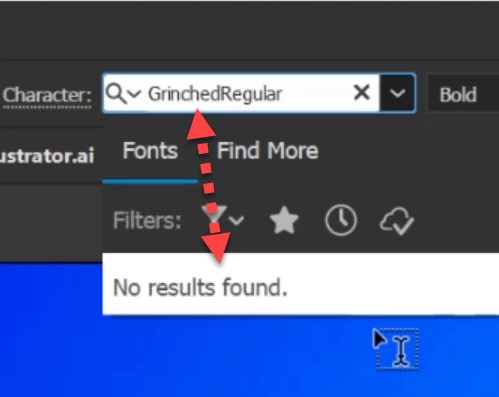
Just now I installed this font & close the Ai app & reopened it to take effect, but it says font is not found. How to fix it?



This topic has been closed for replies.
Correct answer MahaB82A

The font could have some sort of technical problem causing it not to load in Illustrator's fonts menu. It might be worth seeing if the font is available at another free fonts web site. There could be a different build of the font file that might work.


Certain rival graphics applications and font managers can cause some font styles to go missing in Illustrator. If any stuff like that is running try closing those apps and then re-launching Illustrator.


OK I have fix it. Grinched 2.0 works.

1 reply

Bill Silbert
Community Expert
Community Expert
December 4, 2024

Please give details as to how you installed the font. Are you on a Mac or PC? Are you using a font utility like Suitcase or Monotype? Is this an Adobe Font downlloaded from Adobe.com?

MahaB82A
MahaB82AAuthor
December 4, 2024

I use Windows 11, Desktop.

Community Expert
December 5, 2024

The font could have some sort of technical problem causing it not to load in Illustrator's fonts menu. It might be worth seeing if the font is available at another free fonts web site. There could be a different build of the font file that might work.


Certain rival graphics applications and font managers can cause some font styles to go missing in Illustrator. If any stuff like that is running try closing those apps and then re-launching Illustrator.