Participant
January 19, 2018
Answered

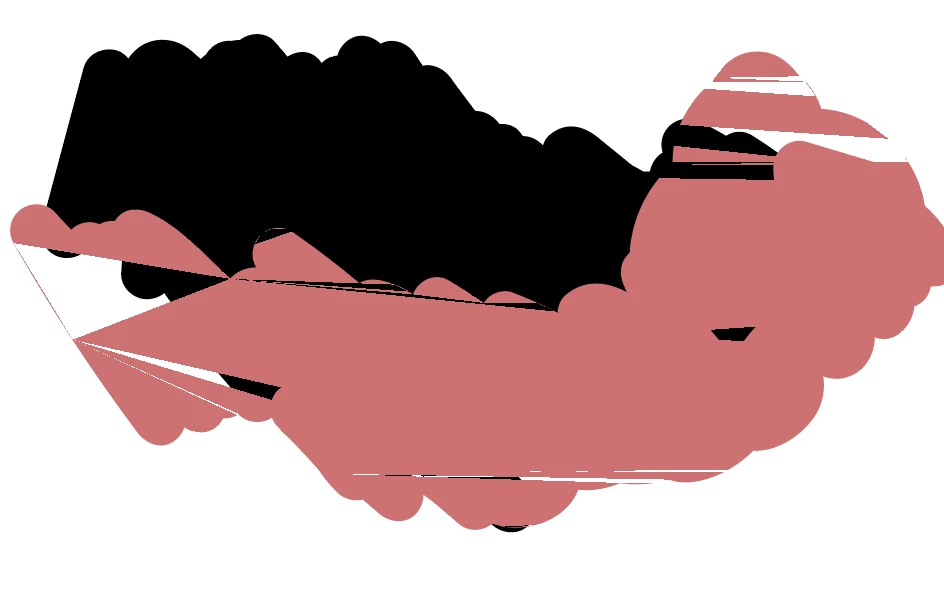
Illustration fragment

  • January 19, 2018
  • 1 reply
  • 773 views

Hi,

I'm using illustrator CC on my MacBook Pro. However, whenever I zoom in and zoom out, it shows like this... this problem also happens on my InDesign.

Does anyone know why this happens? When I save it as JPEF, tiff, or PNG, the image looks normal. 

It would be great if anyone could help me with this problem. Thank you in advance!
    This topic has been closed for replies.
    Correct answer tromboniator

    Click the rocket in the Application Bar to open Preferences > Performance and deactivate GPU Performance. In InDesign, go to Preferences > GPU Performance to deactivate. The actual why is not within my grasp.

    1 reply

    tromboniator
    Community Expert
    tromboniatorCommunity ExpertCorrect answer
    Community Expert
    January 19, 2018

    Click the rocket in the Application Bar to open Preferences > Performance and deactivate GPU Performance. In InDesign, go to Preferences > GPU Performance to deactivate. The actual why is not within my grasp.

    Participant
    January 19, 2018

    Thank you so much!! The problem is solved!!