


August 2, 2017
Answered

Illustrator 2017 exprots blank PDF

  • August 2, 2017
  • 9 replies
  • 36167 views

I did choose Save as PDF.

Open with preview and it comes up as blank.. i choose hoose Export as PDF. Still nothing on  document.

Illustrator 2017. Can someone tell me if there's another way of saving as PDF please?

I'm doing a business card format for myself.

I did group some layers. I also tried resterizing option. I tried group all layers under one group.  Nothing worked.

Thank you.
    Correct answer AvaDeer

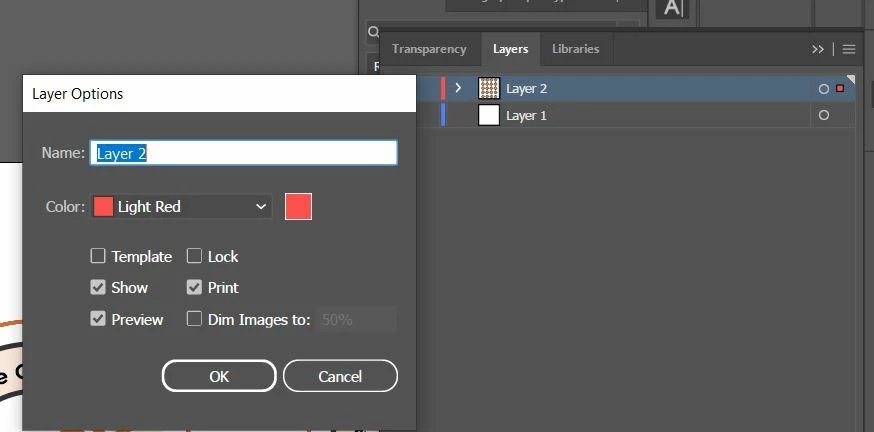
    This worked for me. I had to click on the main layer, not the sublayers. I included a screenshot in case it helps anyone else since I was struggling to figure out how to get the right dialog box to pop up.

    9 replies

    Participant
    May 25, 2023

    It seems to be an internal problem with Adobe Illustrator. I found that problem after leatest update of AI. Nothing works for me.

    I've just uninstalled Illustrator and installed it again. Annoying problem has gone.

    Participating Frequently
    November 11, 2022

    generally defined as the art of music [link disabled by moderator] arranging sound to create some combination of form, harmony, melody, rhythm or otherwise expressive content.


    [ link disabled by moderator ]

    Participant
    October 26, 2022

    That was so helpful! Thanks.

    33delaware
    Participating Frequently
    May 18, 2022

    Had the same problem using Illustrator 2022 Mac. Tried all the settings and nothing. Finally saved as a copy for PDF and it worked this time. Unbelievable and unacceptable that this is still an issue from 2017. 

    Participating Frequently
    September 20, 2022

    The only way that I was able to get it to work was when I selected "Print" and then set the printer to "Adobe PDF".


    Never have this issue. For this project I used "Transform" to create a Step and Repeat banner of a pdf file. Something may be connected to that -- but I tried all of the above approaches and none of the above worked. This added 30 minutes to a relatively easy job.

    Monika Gause
    Community Expert
    Community Expert
    September 20, 2022
    quote

    Never have this issue. For this project I used "Transform" to create a Step and Repeat banner of a pdf file.


    By @Ryan 2535


    Can you perhaps tell us some details of this? Did you use it to create a block shadow?

    Participant
    September 10, 2021

    thank you 🙂

    Brenda Mabbitt
    Participating Frequently
    May 28, 2019

    Hey, folks, I'm having the same problem, only I'm working in Illustrator CC 2019.  I've checked and double-checked all of my layers to make sure that I have "print" selected.  Still coming up with a blank pdf.  Note:  I'm working with a vehicle wrap template, specifically a 2011 Ford E-Series Van.

    EDIT:  Going back, I saved the file as a .pdf again, only this time, I set the Adobe PDF Preset to "Press Quality".  That seemed to solve the problem.

    Participant
    November 10, 2021

    I love you!

    anna-kaisal
    Participant
    August 2, 2017

    Hi!

    I save as PDF and they show normally. No need to group layers or anything. You have to have only "eye" tool open with every layer you want to show as your PDF.

    Go yo your file and right click, choose Adobe Acrobat option and you can see it. You can always open PDFs with other programs too.

    If you are doing a business card, you should add bleeds too before you save the file as PDF.  I prefer InDesign for making business cards. You can place vector graphics and other stuff there too.

    Jeff Witchel, ACI
    Community Expert
    Community Expert
    August 2, 2017

    Can we see a screenshot of the Layers panel? Are you opening the PDF in Acrobat Pro (DC) or in Illustrator?

    If you're not opening it in Illustrator, give it a try to see if your design is still there. Please let up know

    Bill Silbert
    Community Expert
    Community Expert
    August 2, 2017

    In your layers panel double click on each layer and in the Layers Options dialog you’ll see make sure that “Print” is checked. If you see template checked uncheck it and check Print. Then try making your pdf again using Save as pdf.

    Jeff Witchel, ACI
    Community Expert
    Community Expert
    August 2, 2017

    Hey cut it out Bill! Great minds think alike.