DavidTalmage
Participant
October 23, 2017
Answered

illustrator 2018 get error loading plugin

  • October 23, 2017
  • 2 replies
  • 15673 views

I am trying to fix the plugin I have written to work with illustrator 2018 released on 9-23-17

it displays a pop up "Error loading plugins"  followed by the name of the aip it won't load.

The plugin has worked fine in

illustrator cc, cc 2014, cc2015, cc2015.3 and cc2017.

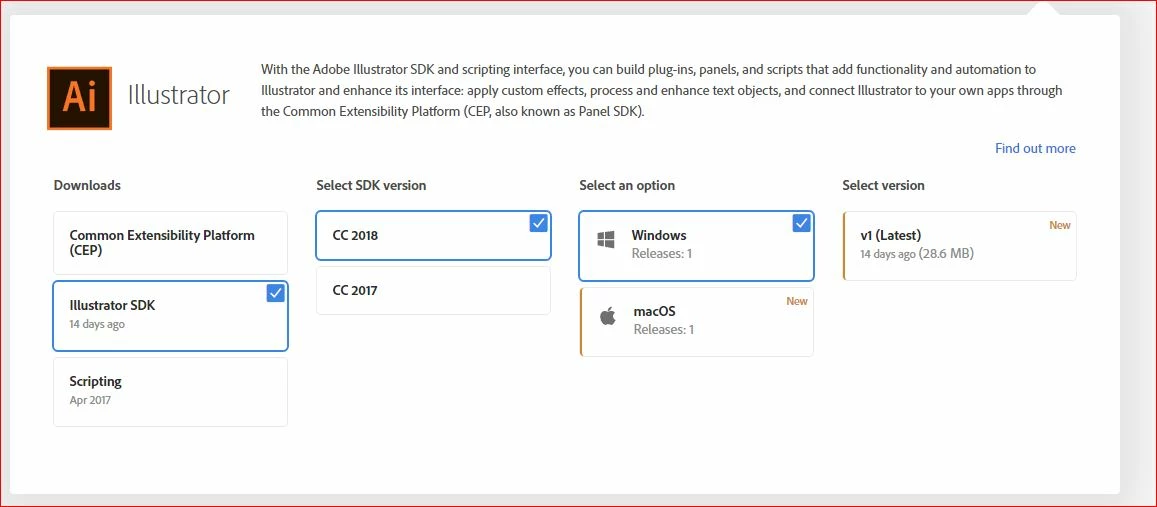
I tried to down load the new sdk for 2018 and it only shows 2017 sdk

So I tried to download 2017 sdk anyway and this link

http://www.adobe.com/devnet/illustrator/sdk/eula_cc_2017.html

displays a 404 error

with a cute page saying that the page cannot be found.

Anyone have an idea what to do next?
This topic has been closed for replies.
Correct answer AshutoshChaturvedi

Our coordinates have changed for SDK download. Adobe I/O Console

Please also consider joining our prerelease program to get early access to SDK for upcoming releases.That is the fastest you will ever get to the build/sdk that will be eventually be released.

2 replies

DavidTalmage
Participant
October 23, 2017
DavidTalmage
Participant
October 23, 2017

recompiling with 2018 sdk fixed issue.

AshutoshChaturvedi
AshutoshChaturvediCorrect answer
Legend
October 23, 2017

Our coordinates have changed for SDK download. Adobe I/O Console

Please also consider joining our prerelease program to get early access to SDK for upcoming releases.That is the fastest you will ever get to the build/sdk that will be eventually be released.