
Inspiring
July 13, 2018
Answered

Illustrator 2018 - Properties Panel

  • July 13, 2018
  • 7 replies
  • 1996 views

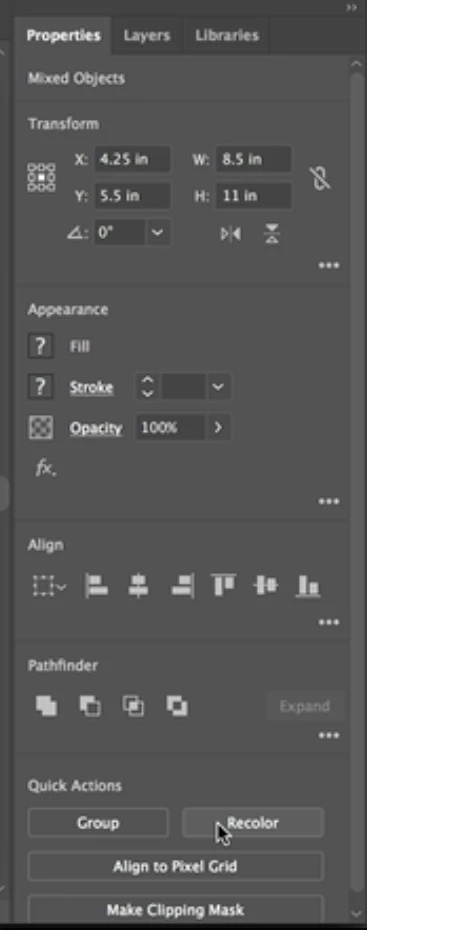
I've been watching Adobe Tutorials, and I worked in Illustrator 2017 and recently installed Illustrator 2018, but I've never seen the Properties Panel. It really would be helpful. But I just don't know hot to access it?
    This topic has been closed for replies.
    Correct answer Mohammad.Harb

    The properties panel has been introduced in CC 2018

    make sure that CC 2018 is running, the Properties panel will show up as its the main paenl in the essential workspace layout.

    window-> properties panel

    to reset the workspace to its default, make sure you are on

    window -> workspace -> Essentials ( Not essential classic)

    7 replies

    Inspiring
    July 13, 2018

    OH.... so it has to be the latest version of Illustrator 2018.

    Jeff Witchel, ACI
    Community Expert
    Community Expert
    July 13, 2018

    Yes!

    Inspiring
    July 13, 2018

    I'm not in Essentials Classic and I'm logged into Illustrator 2018. Not sure why it doesn't show up. Does the properties panel have Creative Cloud features on it?

    Inspiring
    July 13, 2018

    I'm not sure why mine isn't there???

    Jeff Witchel, ACI
    Community Expert
    Community Expert
    July 13, 2018

    As Mohammad.Harb had explained, it was just introduced. So if you're not using the latest CC 2018 version, you don't have it. Download the latest version, and you'll have the Properties panel.

    Mohammad.Harb
    Community Expert
    Mohammad.HarbCommunity ExpertCorrect answer
    Community Expert
    July 13, 2018

    The properties panel has been introduced in CC 2018

    make sure that CC 2018 is running, the Properties panel will show up as its the main paenl in the essential workspace layout.

    window-> properties panel

    to reset the workspace to its default, make sure you are on

    window -> workspace -> Essentials ( Not essential classic)

    Inspiring
    July 13, 2018

    I went to Windows menu... and I don't have it. Are you talking about the Windows tab from the top? It's not there.

    Jeff Witchel, ACI
    Community Expert
    Community Expert
    July 13, 2018

    Windows menu.

    Jeff Witchel, ACI
    Community Expert
    Community Expert
    July 13, 2018

    If you're looking to close the panel, drag it out of the group of panels it's part of (by clicking on the name tab at the top and dragging), and press the X at the top of the panel.

    Jeff Witchel, ACI
    Community Expert
    Community Expert
    July 13, 2018

    If I'm understanding your question, go to your Window menu > Properties.