Participant
June 19, 2018
Question

Illustrator 2018 terribly slow when saving

  • June 19, 2018
  • 4 replies
  • 3428 views

I purchase the new mac book pro with 16g ram and downloaded the newest version of CC apps.

Photoshop and others work perfectly fine but illustrator is the one that I am having a problem with.

Saving the file takes forever!

I googled around, tried almost every solution that is on this forum but no vail.

- Did untick 'pdf compatible' option

- Uninstalled and reinstalled 2018 ver

- Downgraded to 2017 ver

- Change the name/ deleted the preference files from the library folder

- All my files are on my macbook now and I am not using any server

- Macbook is connected to the printer

I noticed once I hit 'save' the program will freeze for like 10-15seconds before it starts saving. And during this time Illustrator is not responding.
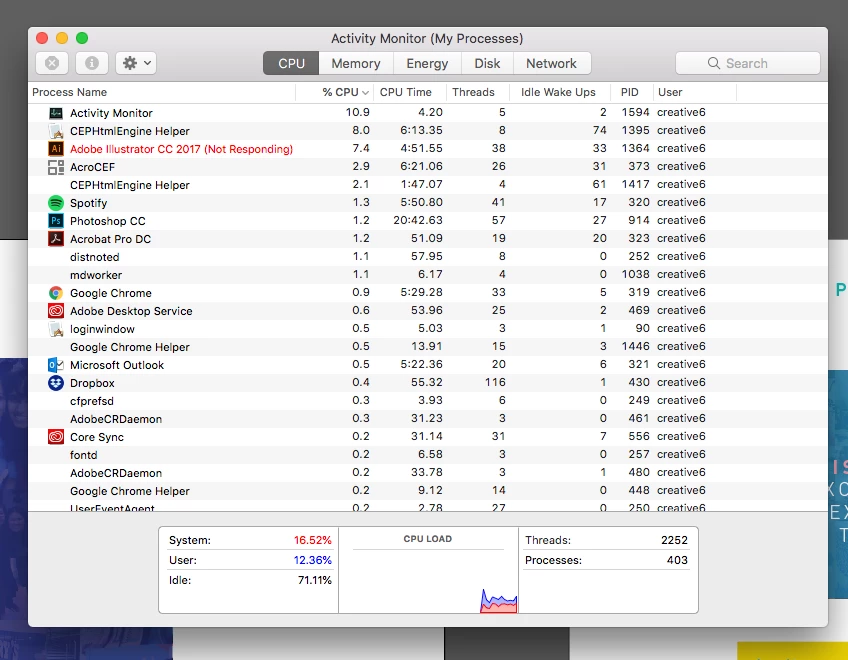
Is there anybody with a solution?

I really appreciate your help!

Kim

    This topic has been closed for replies.

    4 replies

    sharp_hands16B8
    Community Expert
    Community Expert
    June 25, 2018

    Hi Kim,

    I had a contractor working for us who had a similar problem when saving to a directory on their machine that is regularly backing up to a remote server. Similar to a dropbox or google drive folder. Are you seeing comparable speeds when saving to the native documents/desktop areas of your computer?

    Participant
    June 28, 2018

    Hi Mark

    Like I mentioned above, the slow speed was coming from link files that are saved in the server - even though it never happened with my old imac. Not sure if it's adobe app or the server yet... I really don't know where to point my finger yet because the internet speed is fast enough.

    How did your contractor tackle this issue?

    Thanks

    Kim

    Srishti_Bali
    Legend
    June 25, 2018

    Hi Kim,

    As you have already mentioned that the files are saved on the system itself, I would request you to check how the application works in root account: How to enable the root user on your Mac or change your root password - Apple Support

    Create a new file and there try to save and check how it responds.

    Looking forward to your response!

    Regards,

    Srishti

    Participant
    June 28, 2018

    Hi Srishti

    I did some investigation and found out that some link files were saved in the remote server - even though the ai file itself was in my computer. And these link files were causing the slow speed - even though I never had this kind of issue before and our internet speed is really fast (recently upgraded).

    Do you think it is coming from adobe apps or server?

    Thanks

    Kim

    Srishti_Bali
    Legend
    June 29, 2018

    Hi Kim,

    It could be possible, please open the file and package it to desktop with a different name and open it from Desktop and check how it works?

    Regards,

    Srishti

    sharp_hands16B8
    Community Expert
    Community Expert
    June 20, 2018

    Hi Kim,

    could you clarify if this is one file, or set of files, that are saving slowly.

    For example if you create a new file, with nothing on the artboard, and press Save. Is it still very slow with no content? If it's fast, does it slow down when you add Artboards?


    Additionally. When you uninstalled and reinstalled, did you use the Adobe Creative Cloud app manager? I find deleting apps on my macbook does a terrible job of leaving residual preference files, and resource forks (.DS)

    If not, try uninstalling with the app manager, and then doing the reinstall.

    Participant
    June 21, 2018

    Hi Mark, it happens to all my files.

    'Not responding' time will be longer if the file is heavy though.

    I noticed one thing, that once I turn off the wifi, saving seems to be a lot faster - somewhat normal.

    Problem is back once the wifi is back on.

    So I am starting to see the connection between wifi and creative clouds and all.

    Not sure what is causing the problem though.

    Kim

    Larry G. Schneider
    Community Expert
    Community Expert
    June 21, 2018

    What OS are you using? Do you have a firewall installed? Is it set to check every file?

    Srishti_Bali
    Legend
    June 19, 2018

    Hi Kim,

    We are very sorry about the frustrating experience. I would request you to please try resetting preferences for Illustrator:

    Close all Adobe applications.

    ~/Library/Caches

    ~/Library/Application Support/Adobe

    ~/Library/Preferences

    Delete or rename  Adobe Illustrator, com.adobe.illustrator and Adobe Illustrator 22 Settings folders.

    Launch Illustrator from the creative cloud.

    Regards,

    Srishti

    Participant
    June 20, 2018

    Hi Srishiti,

    Thanks for your reply.

    However, the problem still persists after deleting files you mentioned.

    Is there any other way to fix this?

    Thanks

    Kim