dv8kiwi
Inspiring
July 7, 2021
Answered

Illustrator 2021 can only "save as" 2020 (?)

  • July 7, 2021
  • 3 replies
  • 1750 views

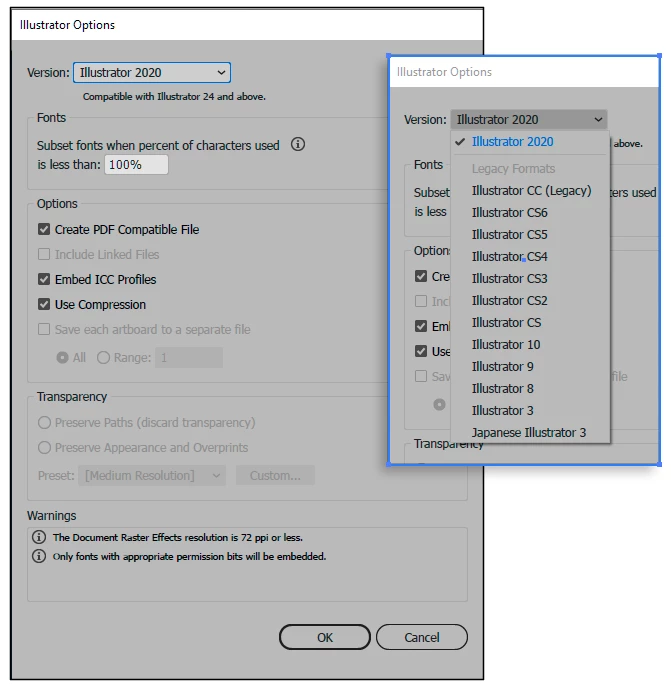
When I choose "Save as…" from 2021 (25.3.1) it appears that I can only save is as a 2020 file, not 2021. Why? I am wondering



This topic has been closed for replies.
Correct answer Test Screen Name

Not an oversight I think. You'll see that although Illustrator has over 20 versions, there are only 12 formats. It's a good thing when it doesn't change on a new version, because sharing files is simpler.

3 replies

Inspiring
July 7, 2021

Hi,


if I definitely want to overwrite the file, although Illustrator believes it is not changed (or if I want to change the setting of "pdf compatible"), "save as" to current version and same name was the best way to do.

So I think I will miss something

Legend
July 7, 2021

"Current version" means "current version of file format". Currently, that would be "Illustrator 2020 file format". Or so it seems to me. 

forebrain
Inspiring
February 24, 2024

It is Feb 24, 2024 and I don't see anyone from Adobe answering this question. 

Test Screen NameCorrect answer
Legend
July 7, 2021

Not an oversight I think. You'll see that although Illustrator has over 20 versions, there are only 12 formats. It's a good thing when it doesn't change on a new version, because sharing files is simpler.

Mylenium
Legend
July 7, 2021

The file format hasn't changed. Probably just an oversight where someone forgot to update the UI string in the list.


Mylenium