
Participant
April 14, 2021
Question

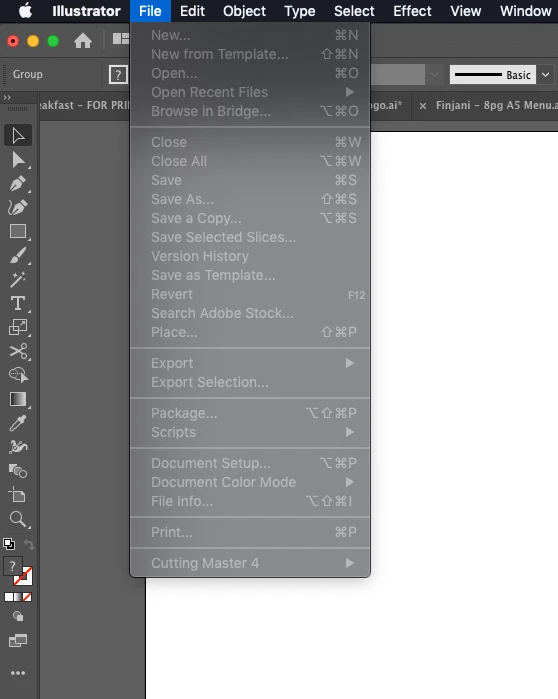
Illustrator 2021 Crashed
  • April 14, 2021
  • 2 replies
  • 153 views

Whats this all about in illustrator? I tried saving something, then this happens. Everything locks, I can't even quit illustrator without force quitting. I'm sick of all these bugs.
I'm running Mojave on Mac Pro 5,1 with Quad Core Xeon, 32gb RAM, 240gb SATA SSD, 120gb SATA SSD for Scratch & 2gb GT720 GPU (cheapest card I could find to run Mojave)

This topic has been closed for replies.

2 replies

Srishti Bali
Community Manager
Community Manager
May 1, 2021

Hi there,


Sorry about this trouble. We have recently released an update for Illustrator 2021 (v 25.2.3) which contains some stability fixes. If you are not already on v25.2.3, then we recommend you to update to latest version.


If it still shows the same behavior, please try the suggestions shared on this page ( https://community.adobe.com/t5/illustrator/resolve-slow-performance-and-unexpected-behaviors-in-illustrator/m-p/11561981#M250493 ) and share your observations with us.


Regards,

Srishti

Monika Gause
Community Expert
Community Expert
April 14, 2021

Which version is it?

Did it ever work with this version?

When did you last reboot the computer?

Where do you save files?

Do you have any third party plugins?

Did you reset the preferences when updating?

Is "Save in background" turned off in the preferences?


Do you have a printer connected, turned on and set up as the default printer? Yes, this is important. Illustrator looks for a printer when saving a a file. If it doesn't find one, it tends to act funky.