
Participating Frequently
May 3, 2024
Question

Illustrator 2024 : Color not matching after changed

  • May 3, 2024
  • 2 replies
  • 1554 views

I have a problem with the color palette in illustrator, it's happening to me and my colleagues at work.

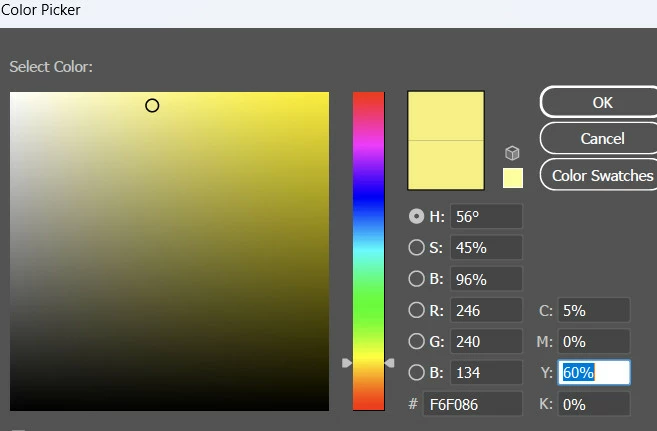
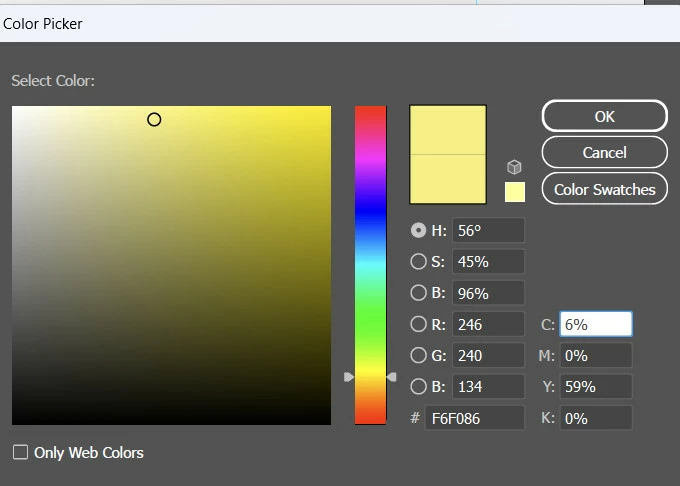
For example, at first I selected the color code F6F086 and clicked ok, but immediately after checking the color code again, the parameters were changed from C: 5% to 6% and Y: 60% to 59%.

1.
2.
And there is another problem: when transferring files, the file will have a skewed artboard.


Please, someone assist or find a way to solve this problem.

Thank you everyone for reading my article.

This topic has been closed for replies.

2 replies

Ton Frederiks
Community Expert
Community Expert
May 3, 2024

If you are working in a CMYK document, specify colors as CMYK.

If you enter Hex or RGB values they get converted to the nearest possible CMYK values.

These CMYK values get converted back to a matching RGB.

Participating Frequently
May 4, 2024

Thank you for responding to me. Like the answers above. I think I'll keep watching until the problem continues and the error persists.

Doug A Roberts
Community Expert
Community Expert
May 3, 2024

1. You're specifying an RGB colour but listing a change in CMYK.


2. Can you show an example of a 'skewed' artboard?

Participating Frequently
May 3, 2024

We use the same CMYK color system. But even after specifying the object to change color, the error still occurs.