

Participating Frequently
Nov 5, 2024 7:11 AM UTC
Question

Illustrator 2025 29.0.1 stroke color doesnt change

Just installed the version 29.0.1. The stroke color affects fill color as i show below.
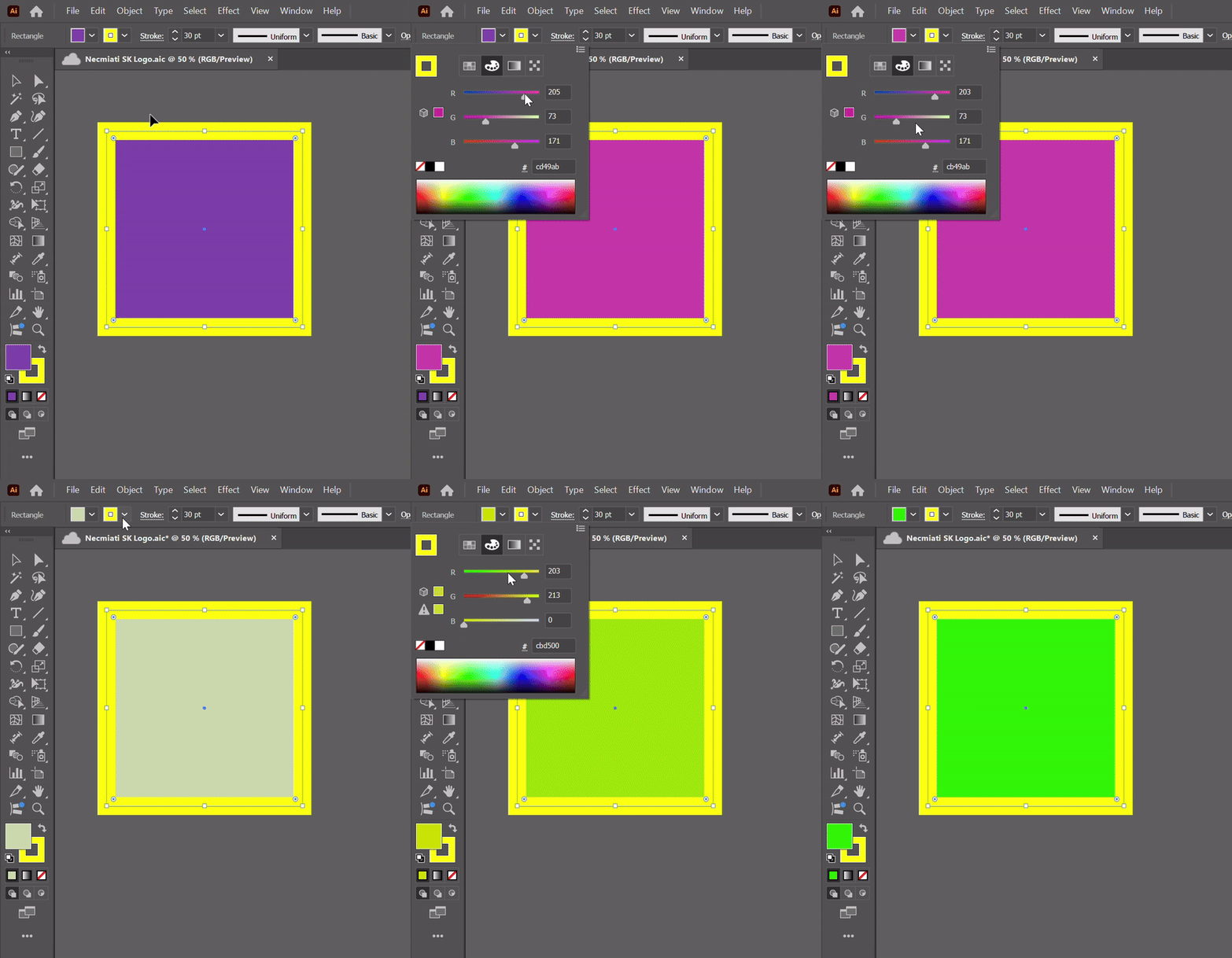


This topic is closed to new replies. Start a new post to keep the conversation going.

21 replies

Participant
Dec 14, 2024 3:11 PM UTC

I'm also have this issue, it's trying me mad...

Translate
Anubhav M
Community Manager
Community Manager
Dec 20, 2024 1:10 PM UTC

Hello everyone,

Our team has tried fixing this in the latest beta release of Illustrator. Would you mind installing Illustrator (beta) and letting us know if it helps resolve the problem?

Looking forward to hearing from you.


Anubhav

Translate
Participant
Dec 3, 2024 6:31 PM UTC

I am having this same issue and have tried everything to fix it. Nothing is working. Has anyone found a way to resolve this yet?

Translate
Doug A Roberts
Community Expert
Community Expert
Dec 3, 2024 7:30 PM UTC

The issue is only with the drop-downs in the control bar and Properties panels. You can still change fill or stroke by making one or the other active and using the colour or swatches panels.

Translate
Participating Frequently
Dec 13, 2024 2:43 PM UTC

how long are we gnna have to wait for an actual fix? this is crazy

Translate
Known Participant
Nov 14, 2024 7:45 AM UTC

In the color panel it seems to be OK
just switch the option in the color panel to what you want to modify.
It doesn't change the fact that it's a bug

Translate
Participant
Nov 15, 2024 11:28 AM UTC

Yes, I was getting crazy since the last update.

When you select a path and wat to change the inside color or the path color, it doesn't matter which one you select, it will only change the one that is active (in front).


What I do is after opening the color I want to change (stroke or innside), on the top part you have 4 icons (samples, color mix, gradient,...). The one selected by default is Color Mix but if you press another and then return to Color Mix, you will have now selected the one you want to change.

Not the best solution, but hope it may help until Adobe fix this bug.


Translate
Participating Frequently
Nov 15, 2024 11:36 AM UTC
Participating Frequently
Nov 14, 2024 6:35 AM UTC
Known Participant
Nov 14, 2024 7:27 AM UTC

let them take care of it

Translate
Doug A Roberts
Community Expert
Community Expert
Nov 13, 2024 8:42 PM UTC

I can replicate in 29.0.1 on Windows 10. Colour sliders only in the control bar seem to only control the active appearance; other options (swatches etc.) work normally. I would say it's a bug.


Can you post a uservoice and share it here?

https://illustrator.uservoice.com/

Translate
Participant
Nov 13, 2024 9:35 PM UTC

I don't know if it's a new feature or bug, but I can confirm this. Very annoying indeed.

Translate
Doug A Roberts
Community Expert
Community Expert
Nov 13, 2024 10:06 PM UTC

It's a bug. For all other modes, selecting a stroke or fill from the control bar menu changes the active appearance. When using sliders, it doesn't.

Translate
Monika Gause
Community Expert
Community Expert
Nov 5, 2024 10:25 AM UTC

I cannot reproduce that (on Mac OS)

Did you already reboot the system?


Translate
Participating Frequently
Nov 5, 2024 2:02 PM UTC

Yes i did.

Translate
Monika Gause
Community Expert
Community Expert
Nov 5, 2024 4:48 PM UTC

Maybe you need to reset the preferences.

This will erase your custom settings: https://helpx.adobe.com/illustrator/using/setting-preferences.html

Translate
