Participant
April 21, 2022
Answered

Illustrator 26.2.1 not responding when creating a new file

  • April 21, 2022
  • 2 replies
  • 1971 views

Hello there, 


I have a bunch of problems with Illustrator CC 26.2.1. 


It looks like it can't create a new file from the startup screen or open any older files from my Finder. 


I tried uninstalling and reinstalling it a few times, ran the Log Tool and the Cloud Cleaner Tool to see if it fixed anything, but nothing works. 


Is there anyone that faced the same problem, and could help me solve this issue? 


B H
This topic has been closed for replies.
Correct answer Anubhav M

Hello @bastien habegger,


Sorry to hear about this experience. Please confirm the exact version of the macOS. Is this an Apple M1-based machine?


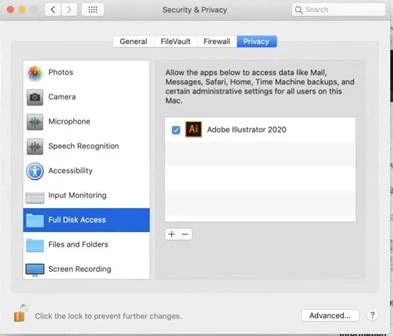
I would request you run Illustrator under the root user account and check if it works. If it does, kindly follow these steps under your regular account:


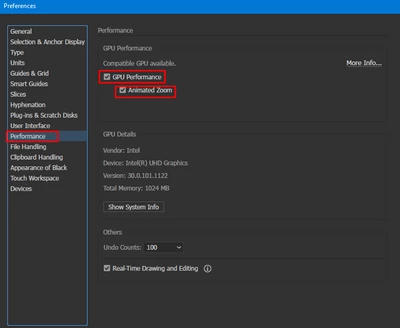
If that does not help, I would request you to please check whether disabling GPU performance and Animated zoom under Illustrator's preferences helps or not.


 Looking forward to your response.


Thanks,

Anubhav

2 replies

Mike_Gondek10189183
Community Expert
Community Expert
April 21, 2022

What mac OS are you running? Is the Adobe Cloud up & running without error? Running the cloud cleaner should have reset your OOBE, but not 100% sure so posting incase helps.


OOBE RESET MAC

  • Quit the Creative Cloud desktop app  (100% you must do this)
  • /Users/<user folder>/Library/Application Support/Adobe/OOBE
  • The \Users\<user folder>\Library\ is hidden by default for macOS 10.7 and above. See Access hidden user library files | Mac OS 10.7 and later for instructions to access it.
  • Delete all the files within the OOBE folder, but do not delete the folder itself.
  • Restart the computer and launch the Creative Cloud desktop app again.
  • Delete all the files within the OOBE folder, but do not delete the folder itself.
  • Restart the computer and launch the Creative Cloud desktop app again.
Anubhav M
Community Manager
Anubhav MCommunity ManagerCorrect answer
Community Manager
April 21, 2022

Hello @bastien habegger,


Sorry to hear about this experience. Please confirm the exact version of the macOS. Is this an Apple M1-based machine?


I would request you run Illustrator under the root user account and check if it works. If it does, kindly follow these steps under your regular account:


If that does not help, I would request you to please check whether disabling GPU performance and Animated zoom under Illustrator's preferences helps or not.


 Looking forward to your response.


Thanks,

Anubhav

Participant
April 21, 2022

Thanks for the fast answer. Here are 2 screenshots about the specs you asked. I'm trying to resolve this issue with your answer and the more recent one below.