sguilford
Participant
January 30, 2026
Question

[Illustrator 26] Text offset from original path, but some is still linked

  • January 30, 2026
  • 5 replies
  • 105 views

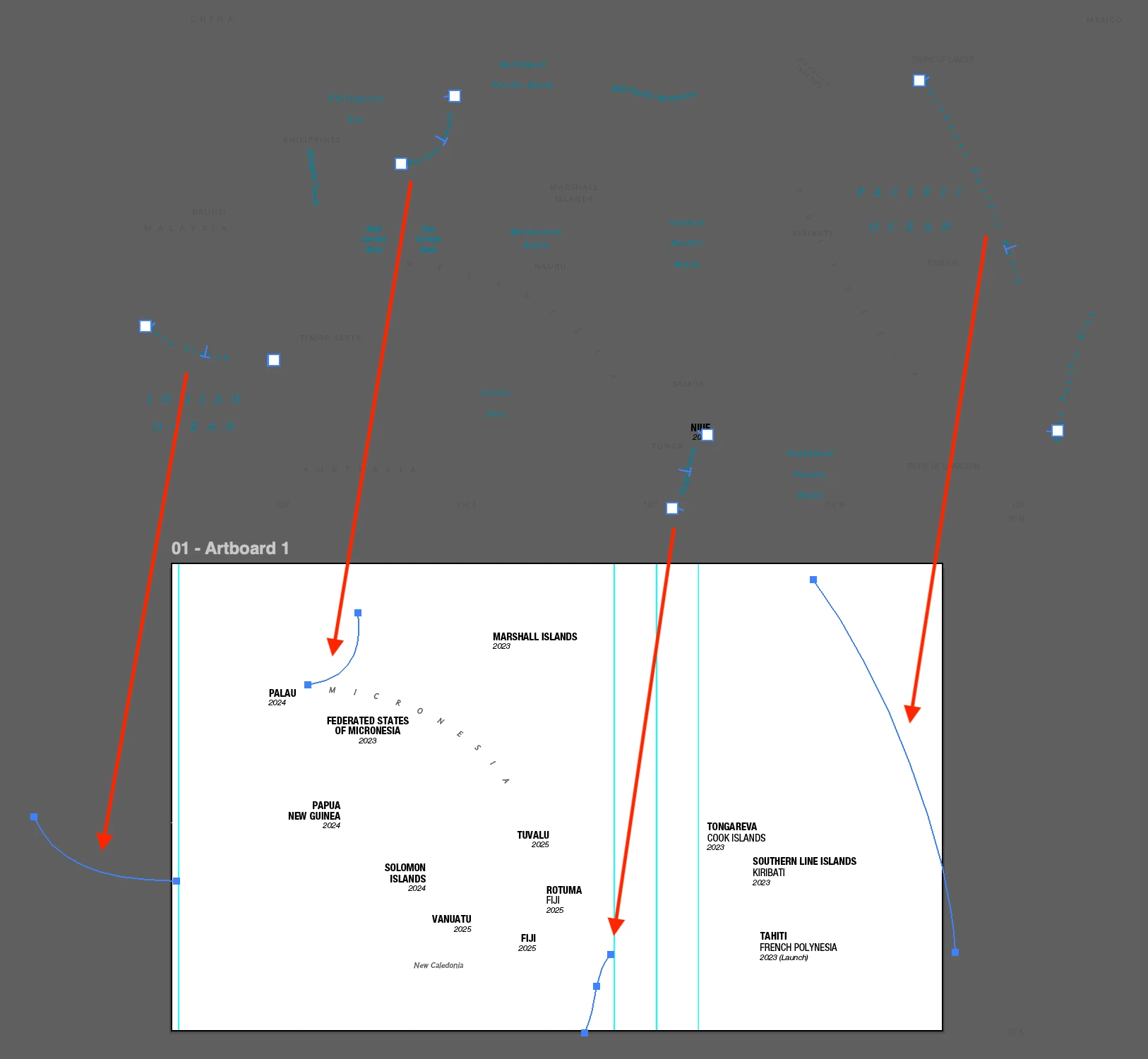
I opened a recently saved file to find that much (but not all!) of my text has been pushed up off the artboard. Path type items seem to be linked to phantom linework in their original locations. Other type has no such connection. And not all text was shifted. What is happening here, and how to prevent? Updated to AI 2026 a month or so ago.

    5 replies

    sguilford
    sguilfordAuthor
    Participant
    February 4, 2026

    Hi all - this appears to be a widespread issue and Adobe is aware. See this Community thread and this bug report. ​@harrisoncole’s solution does provide a fairly straightforward fix for existing files, but I’m hoping a more proactive solution is implemented by Adobe soon.

    m1b
    Community Expert
    Community Expert
    February 3, 2026

    Hi ​@sguilford An interesting experiment would be to try each of the following, separately, and note the result, ie. does the problem go away after any of the following interventions?

    1. Copy and paste one of the faulty items
    2. Copy and paste faulty item into a new document…
    3. With the text tool, select and change the text (content) of one of the faulty items.
    4. With the text tool, select and change some attribute of one of the faulty items, eg baseline shift.

    If any of these fix the corruption, perhaps they could be applied en masse? Or at least you could share a document with just one example item, even with contents replaced with lorem ipsum?

    – Mark

    harrisoncole
    Participant
    February 2, 2026

    I have a partial solution. It fixes the issue with text on paths, however other text will have to be re-placed manually.

    1. Select labels on paths.
    2. Grab a handle on the bounding box and move it– the text should snap back into place.
    3. Undo the transform and the text should stay in place.
    Kurt Gold
    Community Expert
    Community Expert
    January 30, 2026

    Thank you. It is acceptable that you cannot share the file for some reason.


    Unfortunately, at least I am then not able to inspect the issue reasonably and therefore cannot provide any useful advice.


    Someone else may chime in.

    Kurt Gold
    Community Expert
    Community Expert
    January 30, 2026

    Can you share this Illustrator file?

    sguilford
    sguilfordAuthor
    Participant
    January 30, 2026

    Unfortunately I’m unable to share the file. This Adobe post seems to describe a version of the same issue, as does this Reddit post. Convert to Area Type and Convert to Point Type were not options for me, by the way.

    Kurt Gold
    Community Expert
    Community Expert
    January 30, 2026

    Thank you. It is of course acceptable that you cannot share the file for some reason.


    Unfortunately, at least I am then not able to inspect the issue reasonably and therefore cannot provide any useful advice.


    Someone else may chime in.