
Illustrator 26, toolbar blocking rulers & tabbed windows missing
Perhaps this is my own error, so please let me know if there is an easy fix these undesirable UI changes in Illustrator v26....
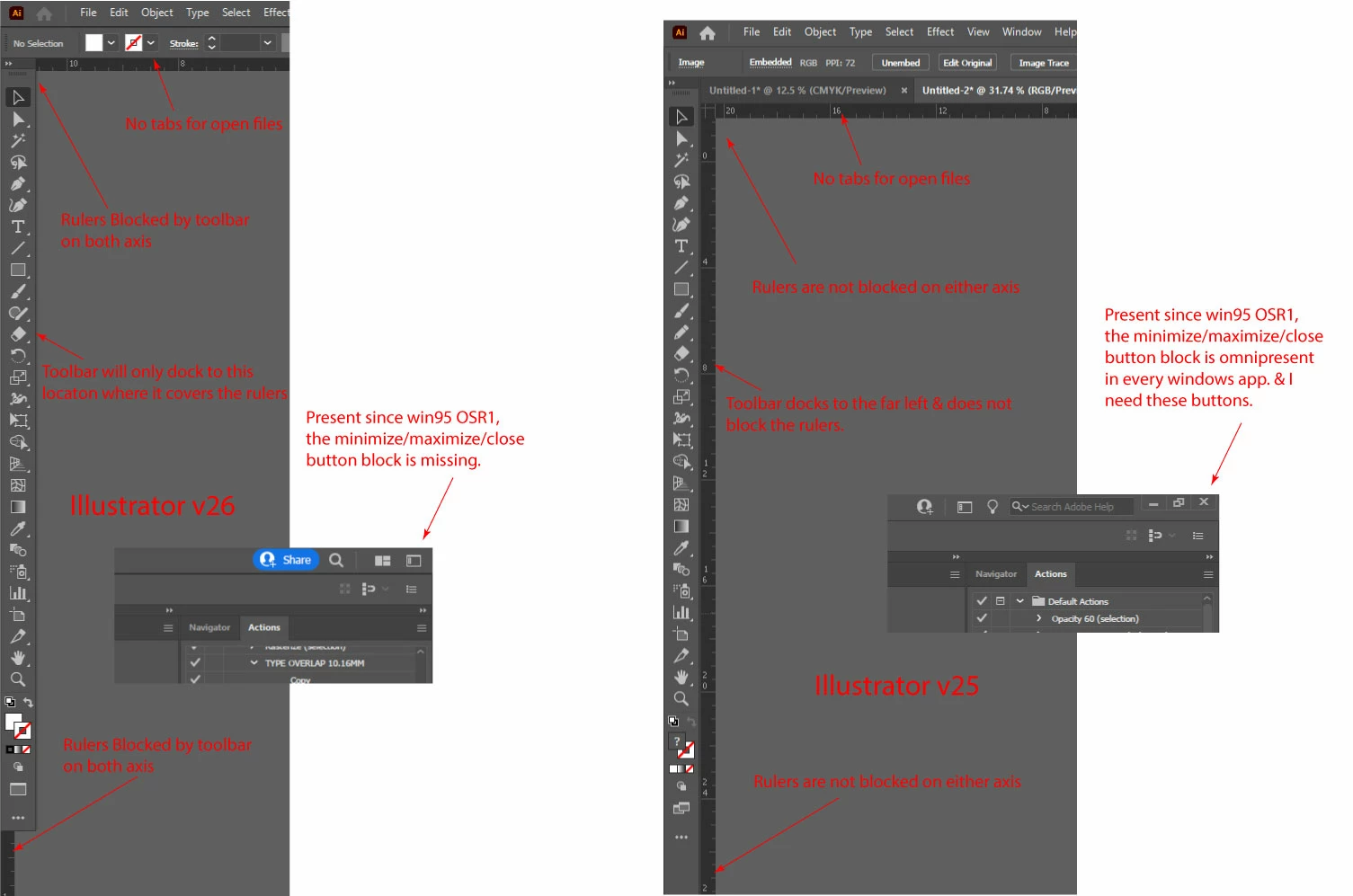
The new UI in Illustrator v26 has the main toolbar blocking portions of my rulers & when I try to dock the toolbar to the far left of the screen it will only dock to a position, where it blocks the rulers.
Also, in v26, when I have multiple files open, I do not have tabs running across the top of my window to easily keep track of open files.
Also in v26 the Minimize/maximize/close buttons (which are omnipresent in EVERY windows desktop app since win95 OSR1,) are missing in v26.. What gives? I seriously need to be able to minimize this window when I want to.
Screenshots w/ details below... Please advise on whether there is a way to work round these v26 UI changes. Thanks!
 AdChoices