Inspiring
July 24, 2024
Answered

Illustrator 28.6 - Transform pannel not working

  • July 24, 2024
  • 3 replies
  • 488 views

Hey folks, just updated my illustrator but now my "Transform" pannel don't show anything.


Even with an object, text or image selected, it keeps blank.
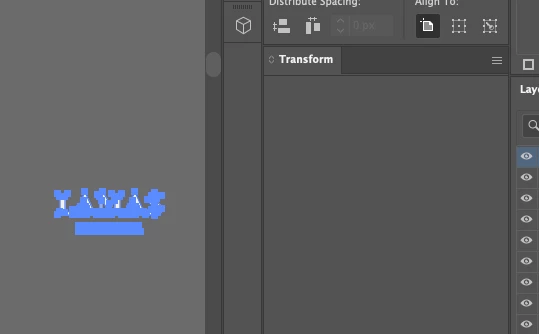
 

This topic has been closed for replies.
Correct answer Ton Frederiks

The first thing you could try is restart your machine, if that does not help, reset preferences.

3 replies

creative explorer
Community Expert
Community Expert
July 24, 2024

@gabriel5E9E after doing the suggested tips from @Ton Frederiks if that all fails, you can also try resetting your 'Workspace' or changing to a different one. 

m
Srishti Bali
Community Manager
Community Manager
July 24, 2024

Hi @17911149


I apologize for the inconvenience you're experiencing. I understand how frustrating it can be. Could you please provide a bit more information?

  • Which operating system are you using?
  • Is the issue specific to a particular file? If so, could you share the file with us?
  • Did Ton's suggestion help resolve the issue? If not, you might try resetting the preferences by following the steps shared here.


We're here to support you!


Regards,

Srishti

Ton Frederiks
Community Expert
Ton FrederiksCommunity ExpertCorrect answer
Community Expert
July 24, 2024

The first thing you could try is restart your machine, if that does not help, reset preferences.

Inspiring
July 25, 2024

Yes, its working okay right now. Ty!

Ton Frederiks
Community Expert
Community Expert
July 25, 2024

Good to hear you've got it working.
