


Participant
October 12, 2023
Answered

Illustrator 28 Retype selection not recognized, text recognition failed. Try another selection

  • October 12, 2023
  • 16 replies
  • 21058 views

Hello, 


I was so exited when I discoverd the Retype-tool, however, I can't get it to work at all. I select the image (or the outlined text if it's in vector), and I click enter and all I get is this: 
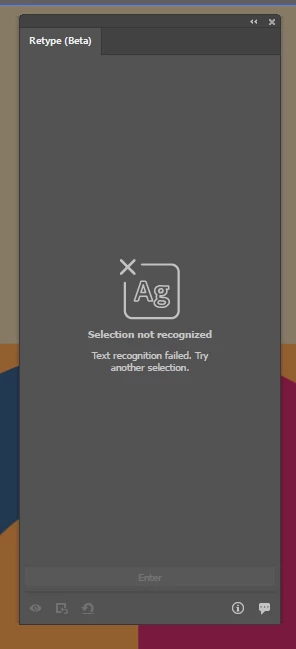
Super bummed, cause it would be so usefull if I could get it to work. Any suggestions?

Correct answer Anshul_Saini

Thank you all for providing the information. I've consulted with the product team, and they suggest trying to incorporate English OCR. Here are the steps to follow:

  1. Click the "Start" button on your Windows system and navigate to "Settings."
  2. Choose "Time & Language" and then select "Language."
  3. Under "Preferred languages," click on "Add a language."
  4. Select the language you'd like to install, choose "English (United States)," and click "Next."
  5. Check all the checkboxes except for "Set as my Windows display language," and then click "Install."


After completing these steps, please check if the issue still persists.


Best regards,

Anshul Saini

@AstrantiaMajor @Vadim274907060f3j @Topeich @forme24654414hwer @Filip Bl. @Magic Plants @Leszek2019 

16 replies

Kurt Gold
Community Expert
Community Expert
October 15, 2023

I did some tests and so far the only pattern I see is that the issue apparently only occurs on Windows machines.


For example, on a HP Z240 Tower Workstation with Windows 10 Pro (10.0.19045), 32 GB RAM, NVIDIA Quadro M2000 the Retype palette in Illustrator is virtually dead. It doesn't recognise anything, no matter what source object you're selecting.


Participating Frequently
October 17, 2023

Same on my both pc from satr, but 1 is start working now, i don't change anything, just star working. on my main pc still the panel not working at al.

Participating Frequently
October 13, 2023

I have the same problem as user @Leszek2019 .
The Retype function does not work, unfortunately no text is recognized. No matter in which font, no matter if as image (png, jpeg) or as paths / vector graphics, nothing is recognized. But text2vectorgraphic works fine.


Illustrator v28.0

AMD EPYC 7543P 32-Core Processor 2.80 GHz

28,0 GB RAM

GeForce RTX A4500 (24GB Vram)

Windows 10 Home 22H2 (x64)

Participating Frequently
October 13, 2023

Edit: i have 20GB vram not 24 🙂 btw.: the retype module is also downloaded.

Monika Gause
Community Expert
Community Expert
October 13, 2023

Can you post a screenshot of the text you want to recognize?

Participating Frequently
October 13, 2023

Having the same issue! Nothing comes up for anything I have tried for months in the beta and now in the main channel.


System Info:

OS Name Microsoft Windows 10 Pro
Version 10.0.19045 Build 19045
OS Manufacturer Microsoft Corporation
System Type x64-based PC
Processor AMD Ryzen 5 3600 6-Core Processor, 3600 Mhz, 6 Core(s), 12 Logical Processor(s)
BIOS Version/Date American Megatrends Inc. P5.30, 8/4/2021
SMBIOS Version 3.3
Embedded Controller Version 255.255
BIOS Mode Legacy
BaseBoard Manufacturer ASRock
BaseBoard Product B450M Pro4
BaseBoard Version
Platform Role Desktop
Secure Boot State Unsupported
PCR7 Configuration Binding Not Possible
Windows Directory C:\Windows
System Directory C:\Windows\system32
Boot Device \Device\HarddiskVolume1
Locale United States
Hardware Abstraction Layer Version = "10.0.19041.2728"
Time Zone Eastern Daylight Time
Installed Physical Memory (RAM) 64.0 GB
Total Physical Memory 63.9 GB
Available Physical Memory 39.1 GB
Total Virtual Memory 95.9 GB
Available Virtual Memory 48.6 GB
Page File Space 32.0 GB
Page File C:\pagefile.sys
Kernel DMA Protection Off
Virtualization-based security Running
Virtualization-based security Required Security Properties
Virtualization-based security Available Security Properties Base Virtualization Support, SMM Security Mitigations 1.0, Mode Based Execution Control
Virtualization-based security Services Configured
Virtualization-based security Services Running
Device Encryption Support Reasons for failed automatic device encryption: PCR7 binding is not supported, Hardware Security Test Interface failed and device is not Modern Standby, Un-allowed DMA capable bus/device(s) detected, TPM is not usable
A hypervisor has been detected. Features required for Hyper-V will not be displayed.

Monika Gause
Community Expert
Community Expert
October 13, 2023

When you first opene Retype, and asked for the first image to be analyzed with version 28, did you download that module?


Also: please show your examples.

Anshul_Saini
Community Manager
Community Manager
October 12, 2023

Hi @AstrantiaMajor,


I'm sorry to hear that you're experiencing issues with the Retype (beta) tool. Let's try to get it working for you. Here are some things to consider:

  • Retype (beta) currently supports Latin scripts only. If your text is not in a Latin script, that could explain the issue.

  • If you're using macOS 11, font identification from the image should work fine. However, to be able to edit the text, consider updating to macOS 12 or a higher version.

  • To fully utilize Retype (Beta), you need to install the Retype module. After the download is complete, you'll receive a confirmation message indicating a successful installation.

If you've checked all these points and are still encountering issues, please provide us with the following details:

  • Your system details (RAM, CPU, GPU generation, and make & model), including the operating system version.
  • Share the specific file or image you are trying to use with Retype.


With this information, we'll be able to investigate the issue further and provide you with the right solution. Thank you for your cooperation.


Best regards,

Anshul Saini

Participant
October 12, 2023

And what if it's not working even in Adobe example file?

Selection was not reconized. What shoud i do to make it work.

Monika Gause
Community Expert
Community Expert
October 12, 2023

I have never tried out that demo file. Can you post a link to it? 


Monika Gause
Community Expert
Community Expert
October 12, 2023

Can you show your outlined text? Just a section?


When the text is distorted, or when the font is too far off from standard lettershapes, then it probably fails. 

Participant
October 12, 2023

It doesn't matter which text, it never works. Here's just a random image, where I tried it.


Monika Gause
Community Expert
Community Expert
October 12, 2023

I don't have an issue with it.