


Participant
December 15, 2025
Question

Illustrator 30.0+ Character dropdown in the Panel doesn't show on top of other Panels

  • December 15, 2025
  • 1 reply
  • 456 views

Illustrator 29.x shows the character dropdown on top of other panels in Illustrator 
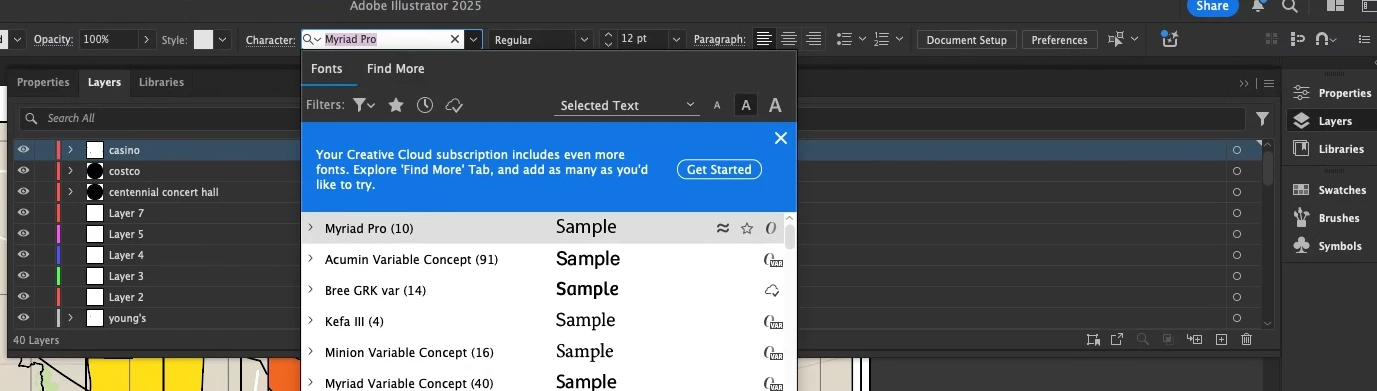
Screenshot 2025-11-17 081818.png


After updating to 30.0, characted dropdown now appear at the back of panels
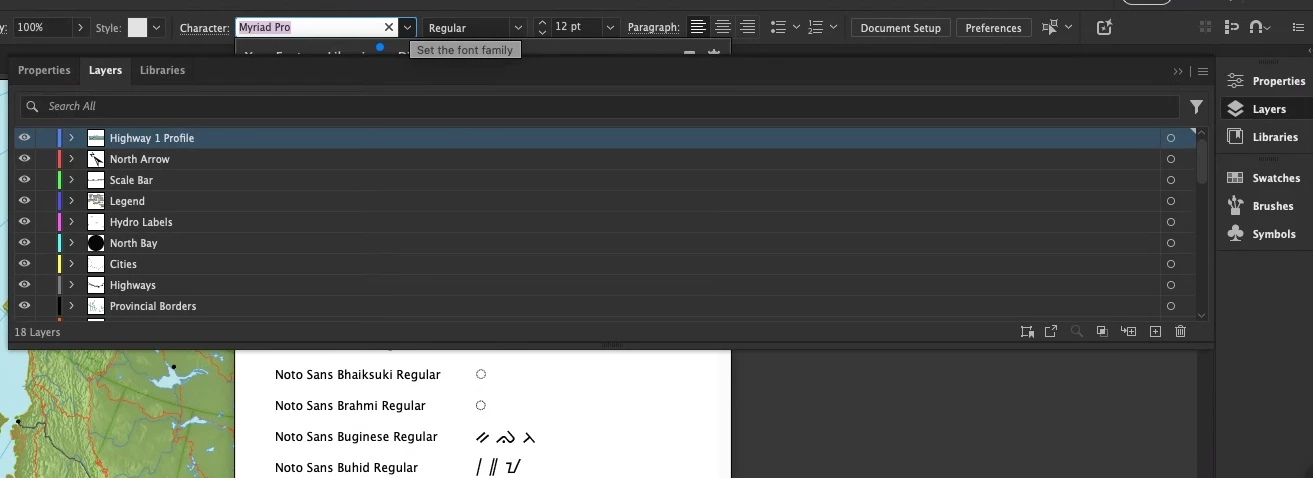
Screenshot 2025-11-17 081552.png


1 reply

Abhishek Rao
Community Manager
Community Manager
December 15, 2025

Hi @Marga5FE2,


Thanks for reporting this. I tested the same behavior here on Illustrator 30.1 on Windows, and the Character dropdown appeared correctly above all panels on my side, so it would help to narrow down what might be different in your setup. Could you confirm the version of your operating system and let me know if this happens in every document or only certain ones? It would also be really helpful if you could try the same workflow in a new local admin user account as well as in Safe Mode to check whether any background service or account-specific setting is affecting panel stacking.

Windows Safe Mode steps: https://adobe.ly/4oPh7Tv
macOS Safe Mode steps: https://adobe.ly/3KyFgQt
Create a new user on macOS: https://adobe.ly/3KyFhnv
Create a new user on Windows: https://adobe.ly/44wFCxz

If the dropdown still appears behind panels after these checks, please try manually resetting Illustrator preferences using the steps in this article and the video included:
https://adobe.ly/3MNJRid


Let me know how it goes.

Abhishek

Marga5FE2Author
Participant
December 15, 2025

Hi,


Thanks for checking it out! I forgot to mention it only happens on MacOS (currently on MacOS 26 but can be reproduced on other machines that are in MacOS 15). I've updated to 30.1 and still see the issue. It happens in any document. I was able to reset prefernces but didn't resolve my issue. I'm unable to create a new user as this is a company-owned laptop. 

Anubhav M
Community Manager
Community Manager
December 17, 2025

Hello @Marga5FE2,

Thanks for confirming. Could you check if this happens when you have a window manager/plugin/another application running along with Illustrator? Also, try switching to a different workspace and turning off Application Frame (if enabled) and share your observations.

Looking forward to hearing from you.

Anubhav