
Participant
February 19, 2024
Question

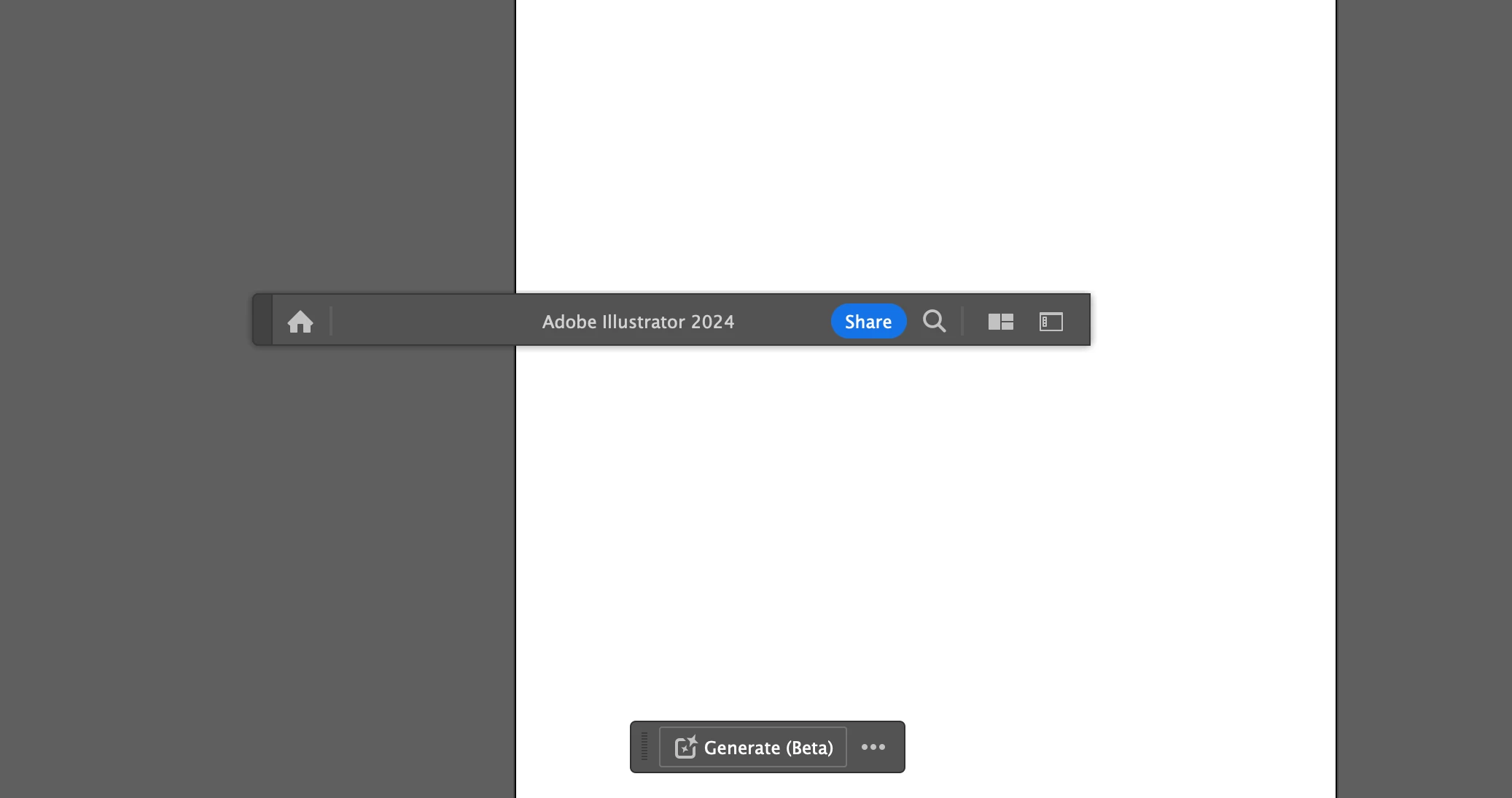
Illustrator "Adobe Illustrator 2024" title bar stuck in the middle of screen

  • February 19, 2024
  • 1 reply
  • 242 views

Hi! For the past few months when I open Illustrator, the title bar that says "Adobe Illustrator 2024" with the home icon and workspace menu remains stuck in the middle of my workspace in front of the artboards. It's very annoying because I have to work around it for all projects. I've updated Illustrator multiple times and nothing works to fix it. Please help. 
This topic has been closed for replies.

1 reply

Anubhav M
Community Manager
Community Manager
February 19, 2024

Hello @Katherine5D7F,

We understand that encountering technical issues can be frustrating. Would you mind trying the following steps and checking if they help:


- Close all Adobe applications.

- Rename the UXP folder to UXP.old from the following location:

(Windows) Navigate to C:\Program Files\Common Files\Adobe\UXP

(macOS) Navigate to Macintosh HD/Library/Application Support/Adobe/UXP


- Relaunch Illustrator


If the problem persists, kindly try manually resetting Illustrator's preferences and share your observations:


For macOS

• Close all Adobe applications.

• Go to the following locations

• ~/Library/Caches

• ~/Library/Application Support/Adobe

• ~/Library/Preferences

• Rename Adobe Illustrator, com.adobe.illustrator and Adobe Illustrator 28 Settings folders to Adobe Illustrator.old, com.adobe.illustrator.old and Adobe Illustrator 28 Settings.old

• Launch Illustrator from the Creative Cloud.


Note: Location starting with this "~" sign indicates the User Library, which is hidden. So, you need to copy & paste the exact path in spotlight search or from Finder Menu > Go > Go to Folder > Paste the location in the dialog box like this:


Image


For Windows

- Close all Adobe applications.

- Go to Location C:\Users\%USERPROFILE%\AppData\Roaming\Adobe

- Rename Adobe Illustrator and Adobe Illustrator 28 Settings folders to Adobe Illustrator.old and Adobe Illustrator - 28 Settings.old

- Relaunch Illustrator from Creative Cloud


Disclaimer: Please note that renaming preferences folders will remove all the custom settings, and Illustrator will launch with default settings. You can also save a backup of the folders in case you want to. The location is mentioned above.


Looking forward to hearing from you.


Thanks,

Anubhav