


allessandror59853268
Participant
March 23, 2017
Answered

Illustrator and network printer

  • March 23, 2017
  • 2 replies
  • 414 views

My illustrator is unbelievably slow in opening and saving file (illustrator CC2017 on windows 7). Just to open Illustrator it takes up to 5 minutes. To save a file (empty file, not a complex one) it also takes up to 5 minutes and the application going into Non Responding mode.

When I remove the office printer from my Devices and printers list everything starts running smoothly and I can open and save in seconds.

But of course this is not a solution, Illustrator is a graphic design software and I need to print what I design, not just stare at it on a screen.

I had an adobe expert remote control my computer trying to fix the issue and all he did was make manual the printer spooler, which doesn't solve anything since when I start it the problem starts again.

Is there a solution to this problem?

Thanks
    Correct answer deantorrz

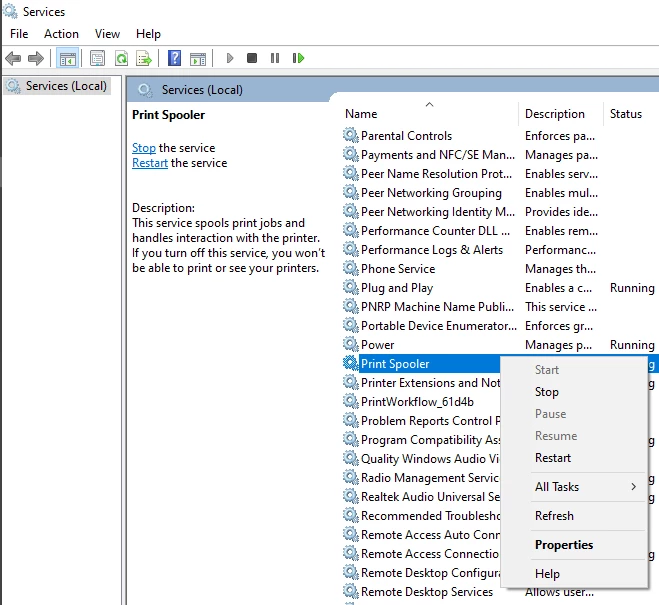
    Its a little bit late. But encountered the same error too. What I did was search for Services > Print Spooler > Restart


    2 replies

    deantorrzCorrect answer
    Participant
    July 29, 2025

    Its a little bit late. But encountered the same error too. What I did was search for Services > Print Spooler > Restart


    Monika Gause
    Community Expert
    Community Expert
    March 23, 2017

    No. Rather it's a known problem.

    Illustrator doesn't like network printer queues. Set up a PDF printer as default printer.

    allessandror59853268
    Participant
    March 24, 2017

    And nobody at Adobe thinks this is an issue that needs to be solved?

    Is there a single office who doesn't have a network printer nowadays?

    Monika Gause
    Community Expert
    Community Expert
    March 24, 2017

    It's not the network printer, but the printer queue.

    At least 95% of people in this forum are not Adobe staff.