Legend
December 17, 2025
Answered

Illustrator Apperance Window Auto Closing

  • December 17, 2025
  • 1 reply
  • 184 views

I am having an issue with the Appearance Tab Auto closing.

This happens whenever I leave the Artboard. I know it did not do this in the past. One check based on a Google Ai search is to clear the cache. However, the cache is not where it shows to be. All the other Tabs seem to be working fine.


Illustrator ver 30.1

Windows Version 10.0.26200 Build 26200
 

Thanks

Correct answer creative explorer

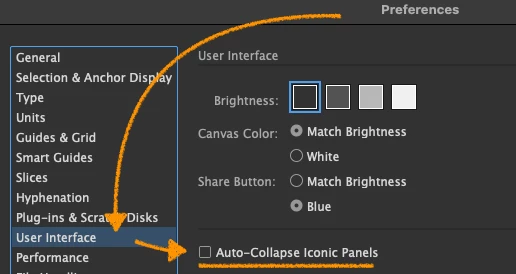
@westdr1dw go into your Illustrator preferences, scroll down to interface, and make sure 'Auto Collapse Iconic Panels' is turned off:

870175i3B7E05969C63FC65.png

If it is checked, uncheck it. This prevents docked icons from snapping shut the moment you click the artboard.

Click Ok when ready. 

You can also clear and reset to Illustrator preferences as well. Quit Illsutrator. Hold down Ctrl Alt Shift. While holding them, click to launch Illustrator. A dialog will ask: 'Delete the Adobe Illustrator Settings File' or 'Reset Illustrator Preferences' — Click Yes. (this will reset your custom workspaces and shortcuts back to it's defaults).


1 reply

creative explorer
Community Expert
creative explorerCommunity ExpertCorrect answer
Community Expert
December 17, 2025

@westdr1dw go into your Illustrator preferences, scroll down to interface, and make sure 'Auto Collapse Iconic Panels' is turned off:

870175i3B7E05969C63FC65.png

If it is checked, uncheck it. This prevents docked icons from snapping shut the moment you click the artboard.

Click Ok when ready. 

You can also clear and reset to Illustrator preferences as well. Quit Illsutrator. Hold down Ctrl Alt Shift. While holding them, click to launch Illustrator. A dialog will ask: 'Delete the Adobe Illustrator Settings File' or 'Reset Illustrator Preferences' — Click Yes. (this will reset your custom workspaces and shortcuts back to it's defaults).


m
westdr1dwAuthor
Legend
December 17, 2025

That worked. However, a little surprising is the Appearance panel remains the same spot regardless of whether the box is checked or not. The Char panel Auto hides regardless whether the box is checked. As long as the Apperance panel remains stationary I'm good. Thanks

creative explorer
Community Expert
Community Expert
December 18, 2025

@westdr1dw I normally create my custom workspaces and remove and add panels that I need only, and so, if I move my panels around, I can always reset them. If you are using default workspaces, you can reset this as well. This is what I do with my students when they are using Illustrator for the first time. Same thing for any other Adobe apps. https://youtu.be/vZCEXdx-QPM

m