Participant
May 22, 2022
Answered

Illustrator ArcGISMapsforAdobeCC plugin issue

  • May 22, 2022
  • 4 replies
  • 4840 views

Hi


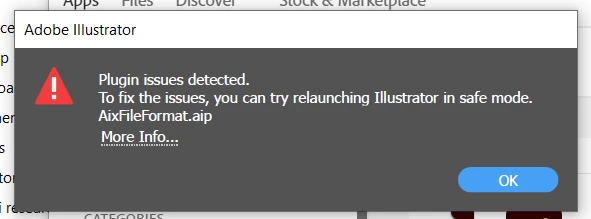
Everytime i open up Illustrator this error msg as seen below. I am trying to work with .Aix files that I have exported from Arcgis Pro. I have tried various methods to fix but to no avail. 


This topic has been closed for replies.
Correct answer Xingdong - Esri

Hello @MyleniumSorry for the inconvenience. The ArcGIS Maps for Adobe team at Esri is working on a solution to address the plug-in's compatibility issue with the latest Illustrator v26.3.1. Please refer to the post https://community.esri.com/t5/arcgis-maps-for-adobe-creative-cloud-blog/illustrator-26-3-1-compatibility-issue-with-maps/ba-p/1174826 for detail and workaround.


Xingdong

ArcGIS Maps for Adobe

4 replies

Linda.R.Smith
Known Participant
August 10, 2023

ArcGISMapsforAdobe_Mac_350.pkg Illustrator plugin "an error occurred during installation.


"The installation Failed..." MacBook Pro  2019 2.3 GHz 8-Core Intel Core i9 MacOS 13.4.1 

I've had the same error with the last "340" plugin. I'd really like to give it another try but honestly I have not had much luck with this plugin since the last time I tried it back in 2019. 


Anyone with a Mac have any success with installing ArcGIS Maps for Adobe CC plugin?

Xingdong - Esri
Inspiring
August 10, 2023

@Linda.R.Smith I am sorry to hear that you were unable to install the latest plug-in on Mac, which is an environment we support and many of the users running our application on. In order to investigate the cause of the issue you have encountered, could you please share some more details about your env:

- Illustrator version, language, and install folder.

- user permission on the Mac. Do you have admin privileges?

- A screenshot of the installer UI when you received the error message


Thanks,


Linda.R.Smith
Known Participant
August 10, 2023

@Xingdong - Esri 

- Illustrator version: 27.7

language U.S. English , and 

install folder Macintosh HD. It's the only place to install the plugin. If I select the "Change Install Locaton..." the only selection in Macintosh HD. 


- user permission on the Mac. Do you have admin privileges? YES

- A screenshot of the installer UI when you received the error message I uploaded a Screen Recording

Xingdong - Esri
Inspiring
June 3, 2022

@miraj245503302byx @Mylenium A new update (v3.1.1) of ArcGIS Maps for Adobe Creative Cloud with a fix to the Illustrator 26.3.1 compatibility issue is now available. Please find more detail here 

Xingdong - Esri
Inspiring
June 3, 2022

Sorry for the broken link in the post above. The correct link to the announcement is here https://community.esri.com/t5/arcgis-maps-for-adobe-creative-cloud-blog/maps-for-adobe-v3-1-1-update-to-support-adobe/ba-p/1179289

Participant
June 6, 2022

I am stuck - upadted to 36.3.1 for illustrator, got the new ArcGISMapsforAdobe_Win_311.exe.

After I log in with my Esri enterprise info - I get the terms of use, but then it goes to Page Not Found. 

Xingdong - Esri
Xingdong - EsriCorrect answer
Inspiring
May 24, 2022

Hello @MyleniumSorry for the inconvenience. The ArcGIS Maps for Adobe team at Esri is working on a solution to address the plug-in's compatibility issue with the latest Illustrator v26.3.1. Please refer to the post https://community.esri.com/t5/arcgis-maps-for-adobe-creative-cloud-blog/illustrator-26-3-1-compatibility-issue-with-maps/ba-p/1174826 for detail and workaround.


Xingdong

ArcGIS Maps for Adobe

Mylenium
Legend
May 22, 2022

Potentially you may need an updated version. Seems like the export is creating garbage data that is not compatible. Though I believe there are similar issues with other AIX files generated elsewhere, so this may not be fixable and you have to use a different export format.


Mylenium