

roberts33286217
Inspiring
September 24, 2017
Answered

Illustrator cc 2017.1.0 soft proof does nothing

  • September 24, 2017
  • 2 replies
  • 2517 views

I'll trying to create a reliable soft proof environment across Illustrator, Photosop, InDesign. I work on a Retina iMac and have Calibrated my monitor using a Datacolor Spyder5 colorimeter. A good deal of my work is for press print in the UK so I have my Adobe CC apps synced via Bridge using the Europe General Purpose 3 profile.

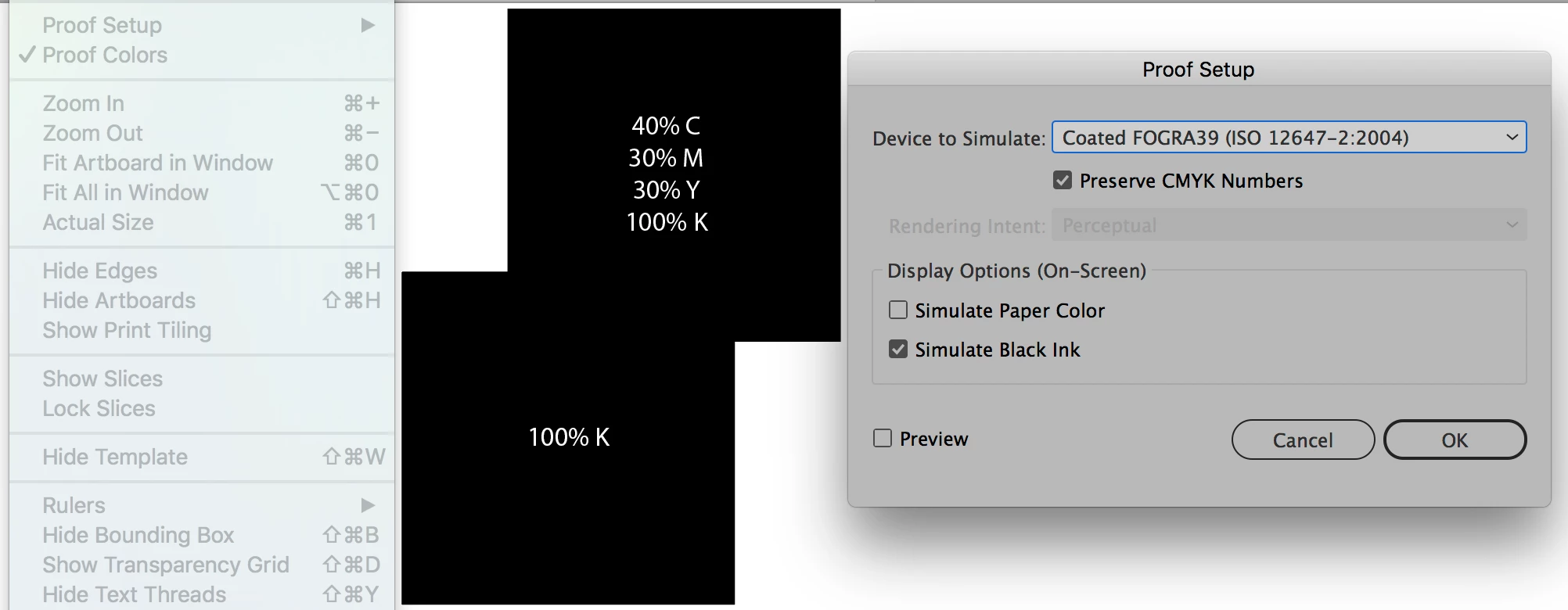
My Illustrator Proof setup settings are:

     • Proof setup > Customize

     • Device to simulate: Coated FOGRA 39 (ISO 12647-2:2004)

     • Simulate Black ink: ticked

If I select proof colours (making the menu item ticked) it has no affect on the appearance of my artwork whatsoever. If I tick 'Simulate Paper Color' this also has no affect. Here is a screen grab of 2 overlapping squares, one set to cmyk super black (40, 30, 30, 100) and the other to 100% K only, proof colours shows no difference between the two. Am I missing something or does soft proofing not work?
This topic has been closed for replies.
Correct answer Monika Gause

So when I create a new file select preview mode > overprint within the 'More Settings' section? Where is 'proofing'?


You need to create a new document profile:

Startup Profiles – A Great tool to Customize your New Documents « Adobe Illustrator blog

2 replies

Participating Frequently
March 16, 2018

There is an Illustrator application preference for controlling the appearance of black on your screen. And it's also in InDesign. The default is to 'Display All Blacks as Rich Black' on your screen. I think this might explain why both your Rich black and 100K patches are displaying the same.  This setting can be changed to.. 'Display All Blacks Accurately' instead.

I think this might help achieve what you are wanting.

roberts33286217
Inspiring
March 16, 2018

This is definitely a gpu problem, I have my black settings set to display accurately but soft proofing does nothing unless gpu performance is disabled under the performance preferences. Hopefully support will be included in a future update.

roberts33286217
Inspiring
September 24, 2017

This appears to be a GPU issue, if I uncheck GPU performance in preferences proof colors and simulate paper works. Pity, makes my GPU a bit useless. Does anyone know if soft proofing will support GPU in the future?

roberts33286217
Inspiring
September 24, 2017

So as a follow on question, does anyone know how to enable 'proof colors' as default. As it stands I have to select it on a file by file basis.

Monika Gause
Community Expert
Community Expert
September 24, 2017

It's a file based setting.

You could turn on overprint preview and proofing in your New document profile and then it should be always turned on. Since this requires some rendering time, it might or might not be avisable to hav it always turned on. Depends on your file.