Einar_Szu
Participant
October 18, 2018
Answered

Illustrator CC 2019 crashes after launch. Mac, Mojave.

  • October 18, 2018
  • 11 replies
  • 25280 views

My Illustrator crashes immediately right after showing the splash screen.    I am on Mojave. MacBook Pro, Late 2013.
The application window without palettes shows up for a split of a second and then boom - it is gone...

Tried to fire the app from an icon in Finder, holding Cmd + Shift+ Alt but it doesn't work.

Anybody?

This topic has been closed for replies.
Correct answer ahmadl10464798

Hi All,

Please check how applications work on Root Account?

How to enable the root user on your Mac or change your root password - Apple Support

If that works fine, please follow these steps and share results:

Go to Location ~/Library/Preferences

• CTRL-click preferences folder and click get info

• Click the lock icon to unlock it

• Click plus symbol

• Change permissions to read and write.

• Click the Action pop-up menu, then choose “Apply to enclosed items.”

• If you do not see your account there click on plus symbol on the bottom left corner and add account and follow same steps
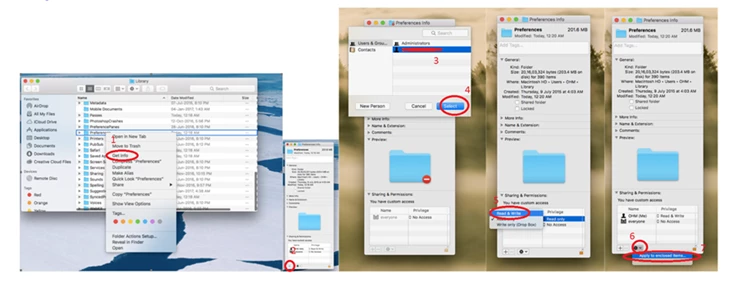
Follow same steps for

~/Library/Caches

~/Library/Application support

/Library/Preferences

/Library/Caches

/Library/Application support

Note: If you are on office system, these (/Library/Application Support and/Library/Preferences) folders may or may not allow you to add the user, that is completely fine.

Restart the system into your account and check how it works.

If that does not help, please try uninstalling using Cleaner Tool: Use the Creative Cloud Cleaner Tool to solve installation problems

Remove all the associated files from above-mentioned locations

Reinstall Illustrator/ InDesign from Creative Cloud Desktop App: Learn how to download your Adobe Creative Cloud apps

Regards,

Srishti


I had the same problem and I found the solution.

1. uninstall all application versions from the Adobe Creative Cloud.

2. When it says do you want to remove all app preferences, chose Yes.

3. install the application again and it will work without any issues.

Regards,

11 replies

Jerri Hemsworth
Participant
January 9, 2019

I'm running High Sierra 10.131.6.

Came back from lunch today and InDesign 2019 14.0 would crash 5 seconds after it launched. Illustrator the same thing. Photoshop was fine. Tried re-installing, etc. and all mentioned above. Nothing worked.

Then remembered from my old mac tech days that this sort of thing was a font issue. Deactivated all my fonts in Font Explorer and voila. All runs fine. Now just need to load fonts individually to find the culprit font.

See if you have too many fonts running, or if you are running decorative/funky fonts, could be that Adobe's interface doesn't want to play in the sandbox with them anymore.

Participating Frequently
January 9, 2019

I just started having this problem today. I can confirm disabling my internet connection, then starting the app works for me. I also restarted my internet connection, closed AI, then restarted AI without it crashing.

Participant
January 9, 2019

Same here, Mac Mojave. It was working fine this past days, but today is crashing right after opening any file. Illustrator is now totally useless in the middle of heavy work. Going back to 22.1 hopefully I'll be able to finish the job.

Participant
January 9, 2019

It seems to work when not connected to the internet.

Participant
January 9, 2019

Same here. I've uninstalled/reinstalled 4-5 times, tried opening in Safe Mode, etc, all to no avail. Unplugged the ethernet and it started right up and stayed open. I've been working on this for about 3 hours after it crashed while in the middle of a project.

yvonne craig14
Participating Frequently
January 10, 2019

I am suffering the same pain. I have to complete a project

Mohamed Al Marouf
Participant
January 9, 2019

I tried to uninstall it but it didn't work.....

kscharwath
Participant
January 9, 2019

I am also having this problem. I've tried re-installing illustrator (removing preferences), and manually deleting all the preference files, to no avail. As has been said earlier, I've noticed that when my machine is not connected to the internet, illustrator does run. And, if I connect to the internet after launch it will continue to run.

watsongroup
Participant
January 9, 2019

This appears to be working for me, too. It's the only of the solutions that did. Hope they catch this in the next update.

Participant
January 9, 2019

I'm having exact sam issues on a brand spankin' New Mac Mini 2018 - just started happening today after a week of working flawlessly. Not sure what the problem is, but I've tried uninstalling, deleting preferences, and everything else above. This is pretty unacceptable as it we require these things for work.

No other plugins at work other than my Cintiq. Holding my breath for a solution. This is as fresh as an install gets.

MacOS Mojave 10.14.2,
Illustrator 23.0.1,

yvonne craig14
Participating Frequently
January 9, 2019

I have uninstall and re installed and it is not working

Participant
January 9, 2019

Same thing just started happening to me and I did all of the above steps as well as a restart holding down the P/R/Command/Shift and no luck..It does work seemingly fine when i have the internet turned off (?)

Participant
November 5, 2018

Same problem here:

Mac 10.14 (18A391)

Illustrator 23.0.1

Already tried removing and reinstalling Illustrator. Manually removed preferences but nothing helped.

Monika Gause
Community Expert
Community Expert
November 5, 2018

Please try and contact support:

Contact Customer Care

You need to be logged in and at the bottom of the page there is the chat.

Participating Frequently
November 5, 2018

Since my name is near the top of this thread, I thought I would add a little info.  I ran AI 23.0 and everything seemed to work fine.  Since updating to AI 23.0.1 I have been getting crashes.  I cannot open docs or great new ones.  It just goes boom.  I received an email from Adobe forums saying to contact support so here I am.  This will either be fixed with OS 10.14.1 or AI 23.0.2.  Time will tell.  Oh, I have also uninstalled AI and removed all prefs.  No change.  AI is knackered. 

creativejake
Participating Frequently
October 18, 2018

Have you looked at the system requirements for the new 2018 version?

Adobe Illustrator system requirements