
stubborncreative
Inspiring
September 30, 2013
Answered

Illustrator CC Drop Shadow Issue

  • September 30, 2013
  • 3 replies
  • 26820 views

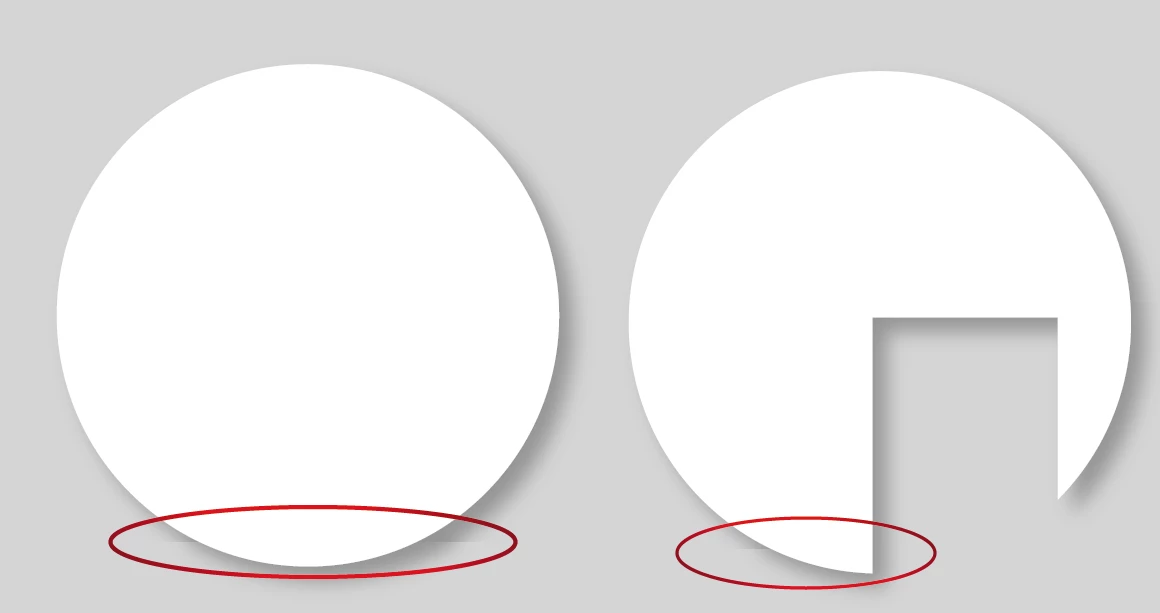
Since upgrading to Illustrator CC, I am having random issues with drop shadows. It doesn't matter if the shadow is applied to a basic vector graphic per screenshot attached, or to a placed transparent image, and it can be on complex shapes or very simple shapes. I get these odd straight lines running through the shadow. It is just a CMYK file (no spot colour), set up for print, document raster effects resolution set to 300ppi. I have tried fiddling with the drop shadow settings, if I move the x and y settings it just moves the line. If I keep the x and y distance the same but remove the blur value, the line disappears (see screenshot without blur). It is not related to transparency, because even if I flatten the image and expand the shadow, it is still there.

This topic has been closed for replies.
Correct answer stubborncreative

Hi Pat121785,

Did you ever get a resolution to this?  I am having the same issue and it's very frustrating!

Cheers


Yes, two ways:

• I upgraded my ram to the max amount my iMac can take.

• I custom reduced "raster effect settings", bring it down a bit at a time, until I reached the limit where the error disappeared. This is not the idea solution but my iMac is old, and this is the only solution I can find until I buy a new retina iMac later this year.

All the best!

3 replies

Participant
August 19, 2020

Oh my god, you have saved my life here! I finished a logo for a client who wanted a drop shadow and when I was just about to do the final export, noticed these pesky lines cutting through the bottom of my graphic's drop shadow. I've been trying to find a solution for days.... thank you sooo much for this solution, worked like a charm! 

Participant
February 4, 2014

I'm having the exact same issue as jmgd, but with the drop shadow effect. It expands after I save my Illustrator CC file. When I reopen it, I can no longer the drop shadow in the appearance panel and the drop shadow becomes its own shape. Has anyone found a fix/explanation for this???

Monika Gause
Community Expert
Community Expert
February 4, 2014

I'm having the exact same issue as jmgd, but with the drop shadow effect. It expands after I save my Illustrator CC file. When I reopen it, I can no longer the drop shadow in the appearance panel and the drop shadow becomes its own shape. Has anyone found a fix/explanation for this???

Is that a file saved from a previous version of Illustrator? And did you just save instead of Save as?

Then it happened, because Illustrator saved the file to the previous file format thus expanding the drop shadow. This is because the drop shadow has been renewed and is no longer compatible with the old version.

Participant
February 4, 2014

You're right, that seems to be the issue. Thanks for your help!

Monika Gause
Community Expert
Community Expert
September 30, 2013

Is the line still there after exporting to PDF?

What is below the object?

stubborncreative
Inspiring
September 30, 2013

Removing everything but the whole circle, it is still there. Copied and pasted to a new blank page just to double check, I got yet another line. Scaled up and down, it changes, some sizes the lines disappear, other sizes they just move. I thought it was when I was working on really large, high resolution signage, but then it happened on a smaller file too.

Have exported as a flattened PDF and the lines are still there.

Cheers,

Julie

Addendum:

OK, I have just dropped the raster effects resolution setting and the lines disappeared. But this is not a solution because I want high resolution.

Monika Gause
Community Expert
Community Expert
September 30, 2013

Have you tried resetting the preferences?

Restart the computer?

And since we're talking about large: how large?