
Rol!
Participant
July 7, 2017
Answered

Illustrator CC - New Brush Pressure Sensitivity

  • July 7, 2017
  • 2 replies
  • 2644 views

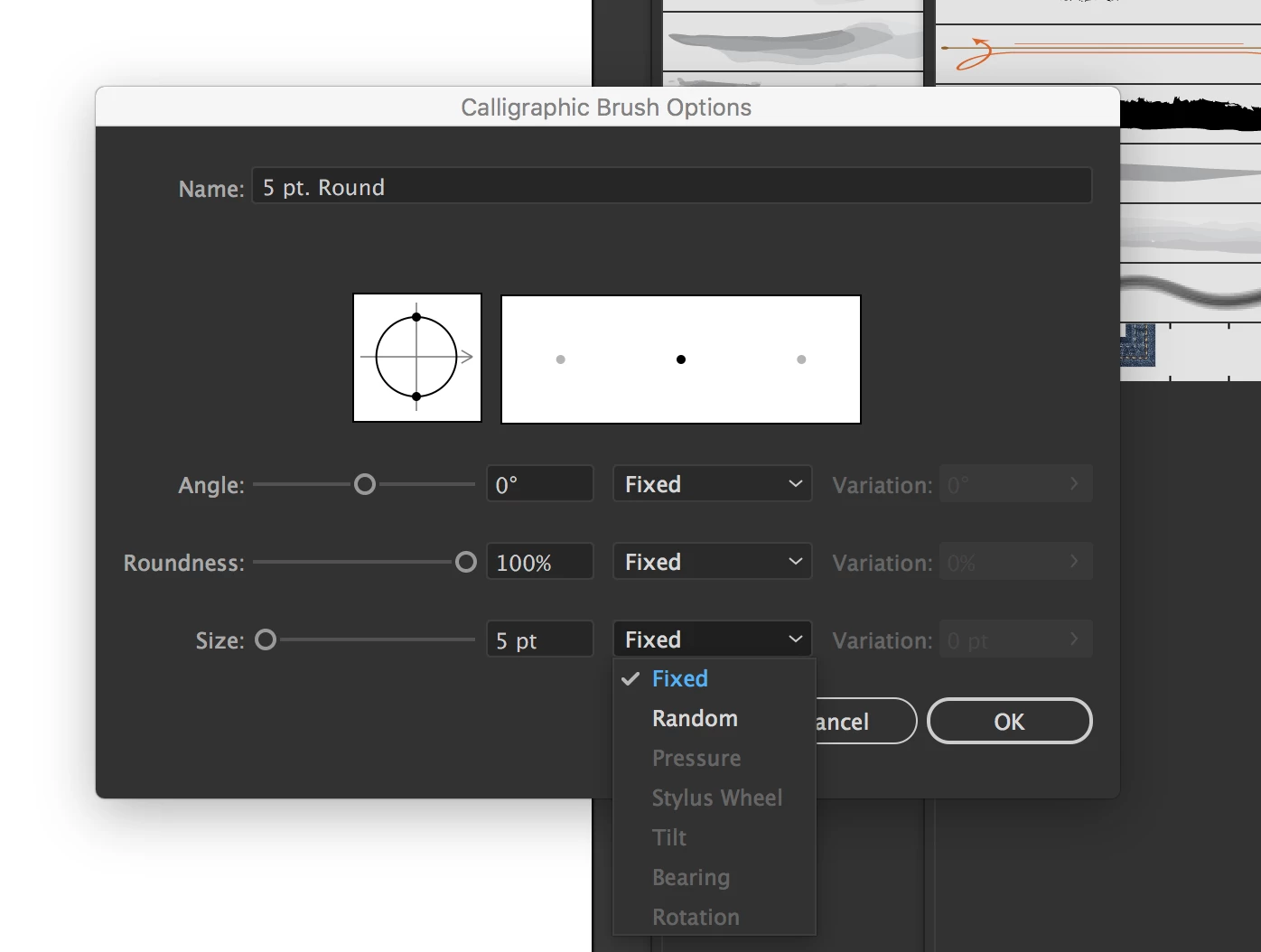
Why are so many options grayed out when I attempt to create a new brush in Illustrator CC?

I've been searching forums, but no solution seems apparent - and the recommendations are really inconsistent: everything from restart your computer to reset your preferences (still not clear how to do this) to Illustrator is just plain old funky!

Here's my setup:

I'm running Illustrator CC (21.1.0) on a Macbook Pro - late 2016 with Touchbar. This runs macOS Sierra (10.12.4).

I use Astropad with an Apple Pencil and a iPad Pro.

I can use the Pen Tool (P), Pencil Tool (N) no problem. Brush Tool (B) is fine, too. The equivalents of these tools in AutoDesk SketchBook (I use this for simple sketches) works great with pressure sensitivity - that is, it's not a hardware issue.

I can't create custom pressure sensitive brushes...and I really, really want to...I need to in order to complete the effect I'm going for in Illustrator.

Here's a screenshot of my issue. It's especially frustrating as I can watch videos of people do this successfully, but I can't seem to get anywhere...please help!
[Here is the list of all Adobe forums... https://forums.adobe.com/welcome]

[Moved from generic Cloud/Setup forum to specific Program forum... Mod]

This topic has been closed for replies.
Correct answer barbara_a7746676

It could be an issue with the driver for your input device. Try updating the driver or contacting the company that makes your input device.

If it turns out that the problem is not with the input device, you can try deleting Preferences How to set preferences in Illustrator  or using the CC Cleaner tool Use the Creative Cloud Cleaner Tool to solve installation problems

2 replies

Monika Gause
Community Expert
Community Expert
July 7, 2017

Illustrator is very prissy about tablets. Actually it really only likes Wacoms.

You could try and install a Wacom driver on top of what you have.

But that's about it. If it doesn't work, ask those people what they have installed. In this forum there has never appearanced someone with your setup.

Therefore it would be very important that you update this thread with whatever you find out. Thank you.

barbara_a7746676
Community Expert
barbara_a7746676Community ExpertCorrect answer
Community Expert
July 7, 2017

It could be an issue with the driver for your input device. Try updating the driver or contacting the company that makes your input device.

If it turns out that the problem is not with the input device, you can try deleting Preferences How to set preferences in Illustrator  or using the CC Cleaner tool Use the Creative Cloud Cleaner Tool to solve installation problems