
Participant
May 10, 2017
Answered

Illustrator CC Rectangular Grid Tool forces skew = -500%

  • May 10, 2017
  • 2 replies
  • 3237 views

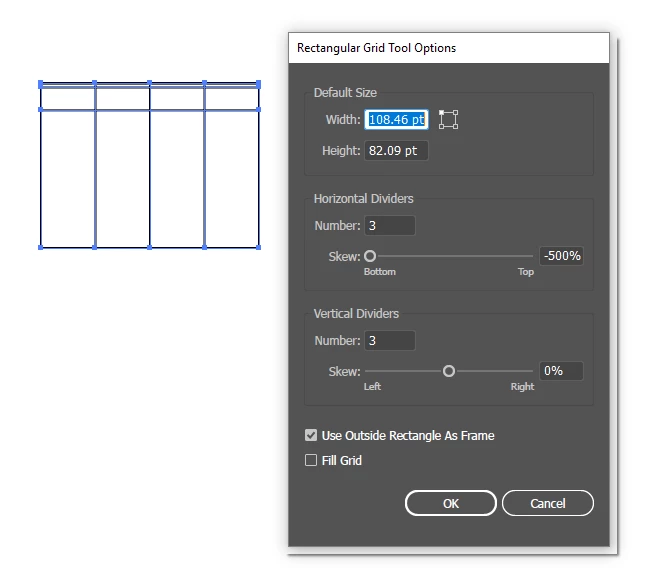
I haven't used the Rectangular Grid Tool in a while, but now I need to and I'm finding that the horizontal dividers skew is refusing to stay set to zero. I open the Rectangular Grid Tool Options, set the number of dividers, set the skews to zero, click OK, draw my grid, and the divisions come out non-linear, as shown below. When I look back at the options, the horizontal divider skew has reset to -500% or something of that order of magnitude. No matter what I do I can't seem to make Illustrator generate a regular grid. Really annoying.

Any suggestions appreciated.
This topic has been closed for replies.
Correct answer Monika Gause

Try and restrt Illustrator.

If that does not help, restart the computer.

If that still does not help, reset the preferences.

2 replies

Ton Frederiks
Community Expert
Community Expert
May 10, 2017

Did you try to Restart Illustrator, Restart your System or reset your Preferences?

How to set preferences in Illustrator

Monika Gause
Community Expert
Monika GauseCommunity ExpertCorrect answer
Community Expert
May 10, 2017

Try and restrt Illustrator.

If that does not help, restart the computer.

If that still does not help, reset the preferences.

Don98674Author
Participant
May 10, 2017

Thanks Monika and Ton -- I had restarted Illustrator and restarted the PC, but had not reset preferences. That did the trick.

FYI, to reset preferences press and hold Alt+Control+Shift (Windows) or Option+Command+Shift (Mac OS) as you start Illustrator.

https://helpx.adobe.com/ee/illustrator/using/setting-preferences.html

(FYI, marking Monika's answer correct only because she was 1 minute before Ton, though Ton gets credit for providing a link)