Participating Frequently
March 27, 2025
Question

Illustrator changed all my Spot colors to CMYK without asking

  • March 27, 2025
  • 2 replies
  • 1138 views

Illy version 29.1.


My artwork has undergone several file revisions over months. Across all revisions I've used clinet specified Pantone colors on objects in the file. From the start, each files has been set to CMYK color mode.


In the newest file revision Illustrator changed all the spot colors to CMYK. The Pantone swatches are still in the Swatch window, but the shapes in the file are now all using CMYK color builds. This causesd a color shift on the latest print run.


This same thing has happend to other members of my team. Specitic spot colors change to CMYK. 
 

2 replies

Brad @ Roaring Mouse
Community Expert
Community Expert
March 28, 2025

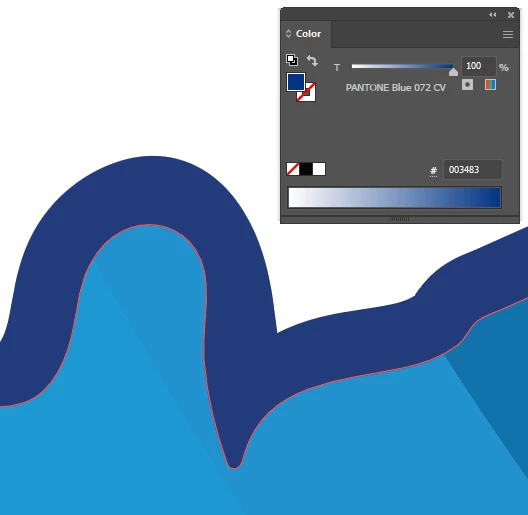
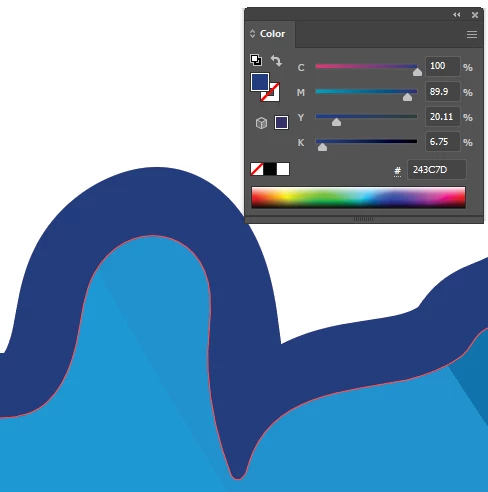
Yah, that's odd. CV swatches were always (and only) CMYK mixes. In fact 072 in the CV library should be 100C 79M 0Y 0K.

The values in the top grab are very definitely color managed conversions to CMYK. This doesn't happen "mysteriously". Someone did something.


Also, I'm wondering why are you using the current Pantone C (solid coated) sets. CV are very old and no longer relevant or even close matches to the true current 072 LAB values.

Participating Frequently
March 28, 2025

I got the Pantone swatches by copying client supplied logs into my original file. I don't know why they show as RGB, or which legacy color library they came from. I only know that everything worked fine for 12 revisions.


On the latest revision I opened the file, changed a single clipping mask (didn't touch any colors), saved as a new revision. In the newly saved file all the Pantones were CMYK.


This has not only affected Pantone swatches. Other team members have had this happen with custom Spot swatches our Zund router needs to operate. If the router software sees a layer with a stroke color using a custom "Kiss-cut" spot color it knows to kiss-cut those lines. Well, my teammate set up his file with that specific swatch and when the print center opend the file, all the custom Kiss-Cut objects were converted to CMYK and were no longer tied to the actual swatch. 


So, regardless of what kind of swatches these are, they are somehow converting in the file save or open process.

Participating Frequently
March 28, 2025

Don't know if this is relevent or not, but I just took a video of my teammate opening a file and for a split second, after the Generating Pixels box pops up we saw this box that said Converting to CMYK. This happens so quickly I can't catch it on my slightly faster machine.

Is this a normal process that happens to every file, or is this something odd.

Ton Frederiks
Community Expert
Community Expert
March 27, 2025

Do you still have the Pantone Libraries?

Where do you store your client Pantone colors?

Do you use CC libraries?

I see in your second screendump that your 072 CV has an RGB Color mode, how did that happen?