
Inspiring
December 7, 2016
Answered

Illustrator changes artboard dimensions

  • December 7, 2016
  • 1 reply
  • 1065 views

Hello all.

I have this intermittent issue with Illustrator changing the dimensions of my artboards slightly. For example: I have to create ads that are 3.1 x 2.41 inches. So I create the size, say 3.1", and Illustrator sometimes round up or down. When I manually go back and reset the size, I can see a noticeable difference on the artboard as it actually expands.

I am assuming that those small point differences won't really affect the final product, but is there any way to customize this option so that Illustrator will use the actual dimensions I type in?

Thanks,

B.
    This topic has been closed for replies.
    Correct answer Ton Frederiks

    You are probably using CC 2017.

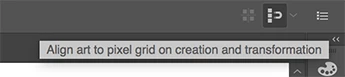
    The Align to Pixelgrid options are no longer in the Transform panel, but you can access at the right side of the Control panel.

    They can indeed affect the size of the artboard. When Align to Pixelgrid is active, the Artboard also aligns to pixel grid.

    Check if the button is checked when the Artboard options are accessed.

    1 reply

    Larry G. Schneider
    Community Expert
    Community Expert
    December 7, 2016

    Is Align-to-Pixel Grid active in the file?

    Inspiring
    December 7, 2016

    I don't seem to have that option. Is it elsewhere?


    B.

    Larry G. Schneider
    Community Expert
    Community Expert
    December 7, 2016

    In what version of AI are you working? Looks like CS4 or so. If that's the case, then Align-to-Pixel Grid is not in play.