paulg58038115
Participant
August 1, 2018
Answered

Illustrator changes x/y coordinates at saving

  • August 1, 2018
  • 1 reply
  • 1554 views

At first save of a specific illustrator file, illustrator adds 3871.5 points to the x coordinates and 3871.5 points to the y coordinates of all points in the work. I am a newbie with Illustrator. It guess it is something in the file. Is it something with the artboard? It doesn't do it with another illustrator file. It doesn't increment further at next saves. I received the file from somebody else.  I cannot find any similar problem online. I have to position points exactly in the file and it is quite cumbersome if I continuously have to subtract 3871.5 points to check if a point is at the correct position as it was before saving. Where in the file could this reside? How can I stop Illustrator doing the addition? Any help would be greatly appreciated.

[Here is the list of all Adobe forums... https://forums.adobe.com/welcome]

[Moved from generic Cloud/Setup forum to the specific Program forum... Mod]
This topic has been closed for replies.
Correct answer Omar.Fathy

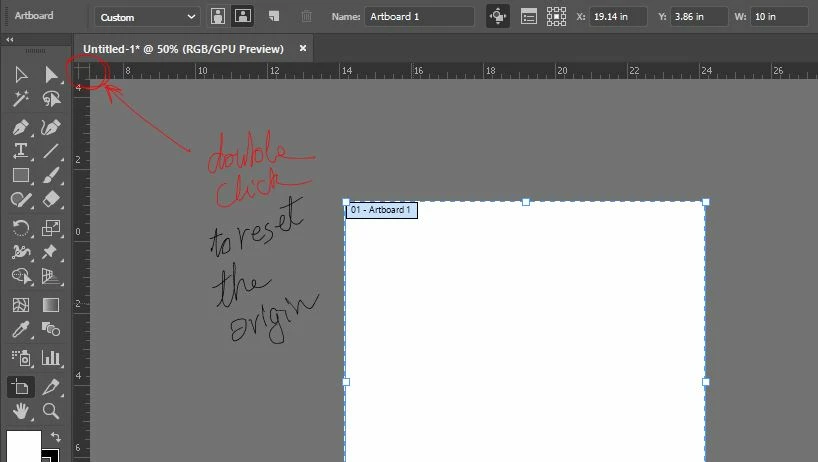
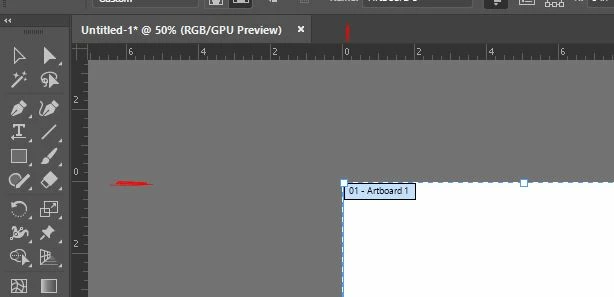
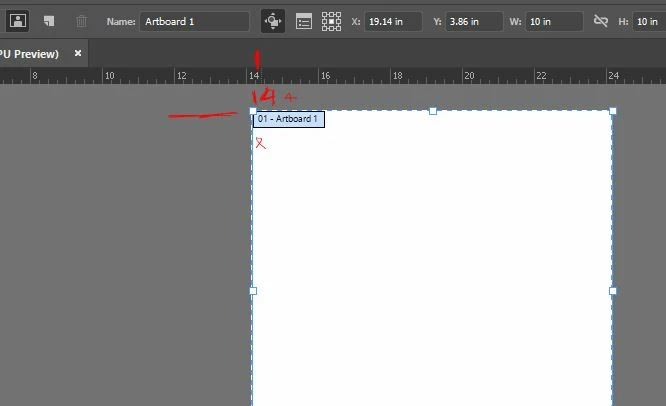
You may need to reset or edit the document origin point to automatically solve the x and w gaps.
to reset the origin point just double-click the intersection square between the horizontal and vertical rulers:

Or Click and drag it to set it anywhere.

1 reply

Omar.Fathy
Community Expert
Omar.FathyCommunity ExpertCorrect answer
Community Expert
August 2, 2018

You may need to reset or edit the document origin point to automatically solve the x and w gaps.
to reset the origin point just double-click the intersection square between the horizontal and vertical rulers:

Or Click and drag it to set it anywhere.

paulg58038115
Participant
August 2, 2018

Dear Omar,

Thank you SO much for your help. Your clear explanation with the screenshots directly solved it. It's a newbie question but I am very grateful for your answer especially as this is a document I'm working on that is personally important for me.

I still don't get it why this occurs by itself (at least seemingly to me), but now I can solve it.

Thanks, thanks, thanks!

Paul Gobée