
pazz1805
Participant
January 24, 2018
Answered

Illustrator clipping mask

  • January 24, 2018
  • 2 replies
  • 2668 views

Hiya,

I have got an illustrator clipping mask that is masking a vector behind it, I would like to delete everything (all the vectors) that is outside the clipping mask because I would like to get it engraved with a laser cutter but on EPS Ethos, when I open the illustrator file, even the vectors behind the clipping mask show up. I was wondering if anyone could help!

Thank you!
This topic has been closed for replies.
Correct answer Anna Lander

Oh ok. I have expanded it but I am not quite sure what to do next...?

(Thank you! Again, I'm sorry I'm new to this!)


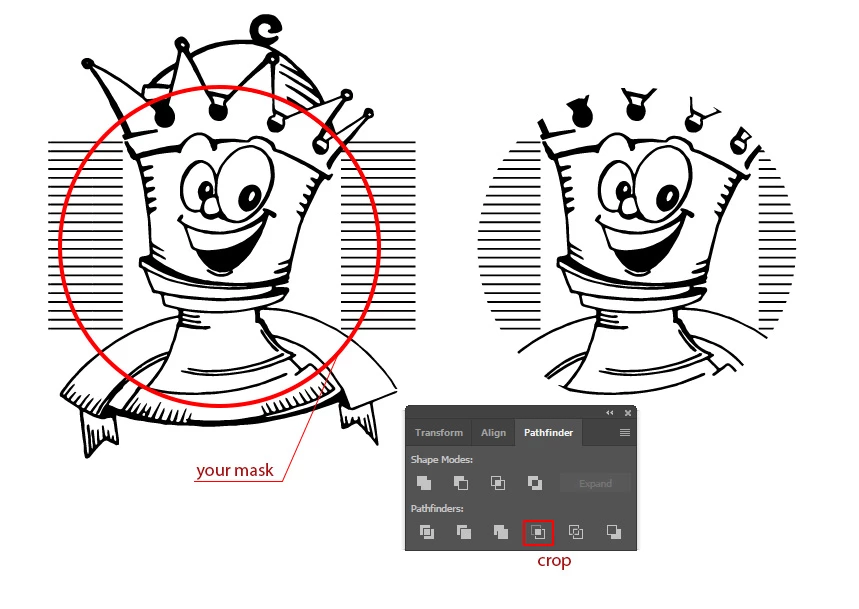
To delete all outside elements you can use Crop function instead of Clipping Mask.

1. Use your expended image and put the masking shape above it.

2. Select all and click Crop button at the Pathfinder palette

3. Ungroup the result.

4. Delete the objects that have "None" as fill and stroke (you can select 1 element, you will see it at the edge of your masking shape, and then use Select -> Same -> Fill & Stroke command)

2 replies

Community Expert
January 24, 2018

I think you can find answer to your questions here How to use and edit clipping masks in Illustrator

Monika Gause
Community Expert
Community Expert
January 24, 2018

It totally depends on what exactly it is that you want to clip.

Any live strokes in it?

pazz1805
pazz1805Author
Participant
January 24, 2018

What do you mean by 'live strokes'? (I'm sorry I'm not very advanced in this!)

It is a pattern that is a series of vector lines..

Monika Gause
Community Expert
Community Expert
January 24, 2018

Live strokes means a stroke width or dashes or anything that can be applied as a stroke.

You have a pattern? So you will have to expand the pattern and then see what's in it.

But since you need strokes for your laser cutter to engrave them, it will get close to impossible to apply your mask. WHen doing this kind of operation in Illustrator, you will have to expand strokes to shapes.