


Participant
May 15, 2025
Question

Illustrator Color Dull Help

  • May 15, 2025
  • 2 replies
  • 193 views

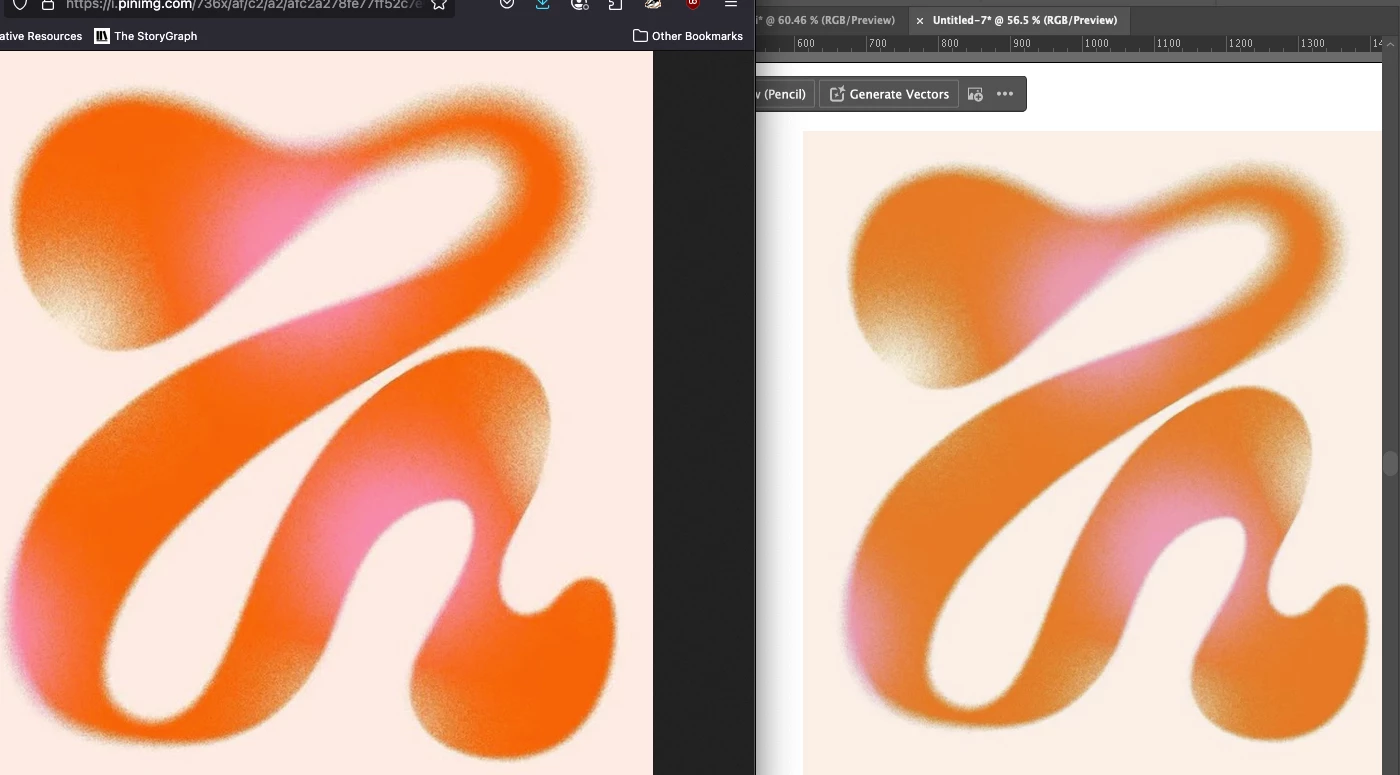
Hi, can I please get some help figuring out why my colors would be extremely dulled down compared to what is in the browser. I've created a new file 1920x1080px, RGB mode, 300dpi. Color settings are North american general purpose 2. I've attached a screenshot of what I'm dealing with. Not really sure why the vibrancy can get so dull in Illustrator.
2 replies

Monika Gause
Community Expert
Community Expert
May 15, 2025

Does it get better in CPU preview?

Anubhav M
Community Manager
Community Manager
May 15, 2025

Hello @Nicole38816539nnsj,

Are you using Illustrator on Windows? If yes, would you mind trying the suggestions shared in this community post (https://adobe.ly/3GUP7h8) to check if they help.


If you're on macOS, please try recalibrating your monitor for sRGB (https://adobe.ly/43yHPZ6), restarting your computer, and then relaunching Illustrator to see if it helps.


Also, kindly synchronize color settings across Adobe applications by following the steps here (https://adobe.ly/4jVeY74) and share your observations.

Looking forward to hearing from you.
Anubhav